


Inspiring
Aug 8, 2020 7:04 PM UTC
Answered

Where are my transform handles?

Sometimes without even trying, transform handles appear in

my program window.  But whenever I want them, it's always

a battle to make them show up.  I just want to scale and drag

the anchor point, etc.,  like in photoshop.  I have the transform

effect pasted onto my clip. but there are no handles, etc.
 

This topic is closed to new replies. Start a new post to keep the conversation going.
Steve ZeeeeeCorrect answer
Inspiring
Aug 8, 2020 7:47 PM UTC

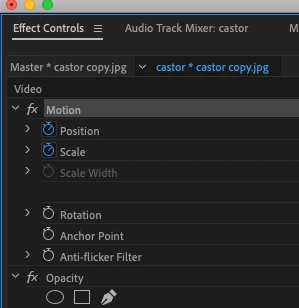
When you click on the word Motion in the Effect Controls panel, with the clip selected on the timeline, you don't see the blue lines appear?

Then try resetting your workspace, menu Window > Workspaces > Reset to Saved Layout.


MtD


Thank you Ann

Yes blue lines appear around the panel.  But nothing

seems to make the transform handles show around the

clip anywhere to change the clip.  Also when I try to move

the anchor point around, I dont see any anchor point.

The picture just moves as if I'm changing the position of the picture.

Reset = no change

Still no spell check here

8 replies

Ann Bens
Community Expert
Community Expert
Aug 8, 2020 7:06 PM UTC

Highlight the clip in the Effect Controls

or

double click in the Project window.

Translate
Inspiring
Aug 8, 2020 7:16 PM UTC

no luck there

Translate
Inspiring
Aug 8, 2020 7:39 PM UTC

When you click on the word Motion in the Effect Controls panel, with the clip selected on the timeline, you don't see the blue lines appear?

Then try resetting your workspace, menu Window > Workspaces > Reset to Saved Layout.


MtD

Translate