
Question
Where are Stylistic Alternates for titles in Premiere Pro CC?
Hey all,
Hoping there's a solve. I'm editing a commercial with several titles/copy throughout.
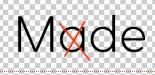
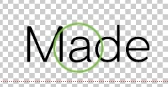
The font we're using includes "Stylistic Alternates". However, Premiere Pro produces an "a" that incorrect. Curious if there's a solution to this within Premiere Pro?
For example, when applying "Stylistic Alternates" in Photoshop, you can see the difference in the photos below. I would like to apply the same "Stylistic Alternate" to my titles in Premiere Pro so I'm not having to work in Photoshop and Premiere Pro.
Is there a way to turn on Stylistic Alternates for a font in Premiere Pro?
Best,
Ben
 AdChoices