Inspiring
February 18, 2026
Answered

Where does Premiere save custom Label color presets?

  • February 18, 2026
  • 1 reply
  • 11 views

I’m one of four Assistant Editors on a docuseries and we’re very close to turnover on three episodes. I’ve created & saved a custom Label Color preset and would like to share them with the other AEs so they don’t have to recreate the wheel. I can’t find the Label Color preset in Documents (we’re on Mac). Where does Premiere save custom Label color presets?

    Correct answer MyerPj

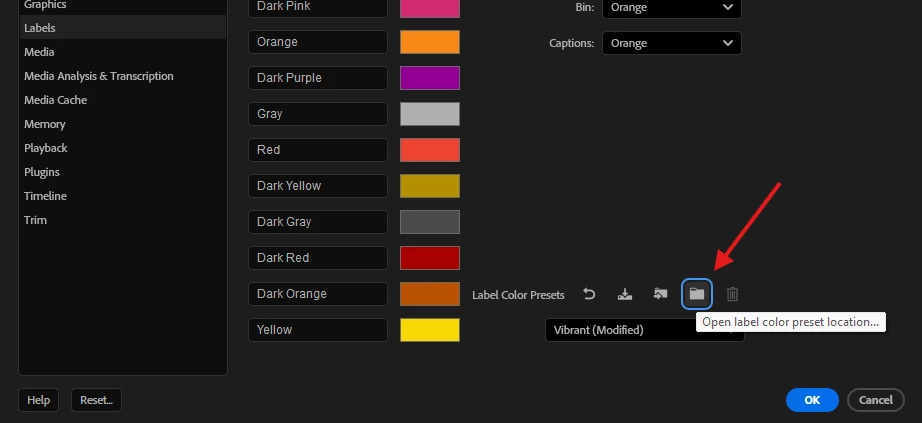
    It’s right on the Label preference screen:


    Here’s the path for Windows users:

    %UserProfile%\Documents\Adobe\Common\Assets\Label Color Presets

    1 reply

    MyerPj
    Community Expert
    MyerPjCommunity ExpertCorrect answer
    Community Expert
    February 18, 2026

    It’s right on the Label preference screen:


    Here’s the path for Windows users:

    %UserProfile%\Documents\Adobe\Common\Assets\Label Color Presets

    KazuTaAuthor
    Inspiring
    February 18, 2026

    Ah! Thanks ​@MyerPj . I’d been accustomed to going to:
    /Users/[computername]/Documents/Adobe/Premiere Pro/24.0/Profile-[computername]

    MyerPj
    Community Expert
    Community Expert
    February 18, 2026

    I’ve yet to find a way to get around those version numbers. I keep two environment variables, and my desktop shortcuts (win) use those to get their location when the year change, ie: 2025 → 2026, so I only have to change that variable when the new update comes. (This year was more hassle because the PP year didn’t change when several of the other  CC programs did). 😊

    "C:\Program Files\Adobe\Adobe Premiere Pro %PPYear%\Adobe Premiere Pro.exe"