
Inspiring
November 15, 2024
Answered

Where is "Based on Source" in Video Settings?

  • November 15, 2024
  • 10 replies
  • 823 views

I can't get a video to export correctly for Instgram.  It's either like a postage stamp in the middle of a black screen or the screen shrinks to fit its small size.  I was told previously to click on "based on Source" in the Video Settings but I can't find that option.  Instead, I find "Match Source" and got the latter result described above.  My impression is that the video should be 1920x1080 since (I believe) 1080x1920 results in a 1080px high video and I want the video to be 1920px high.  I tried 1920x1080 Full HD but this gave me the same result as above.  If there is a failsafe way to obtain the results I need (for exporting for Instagram) that would be great to know so I don't have to go through this repeatedly.   Thanks.  
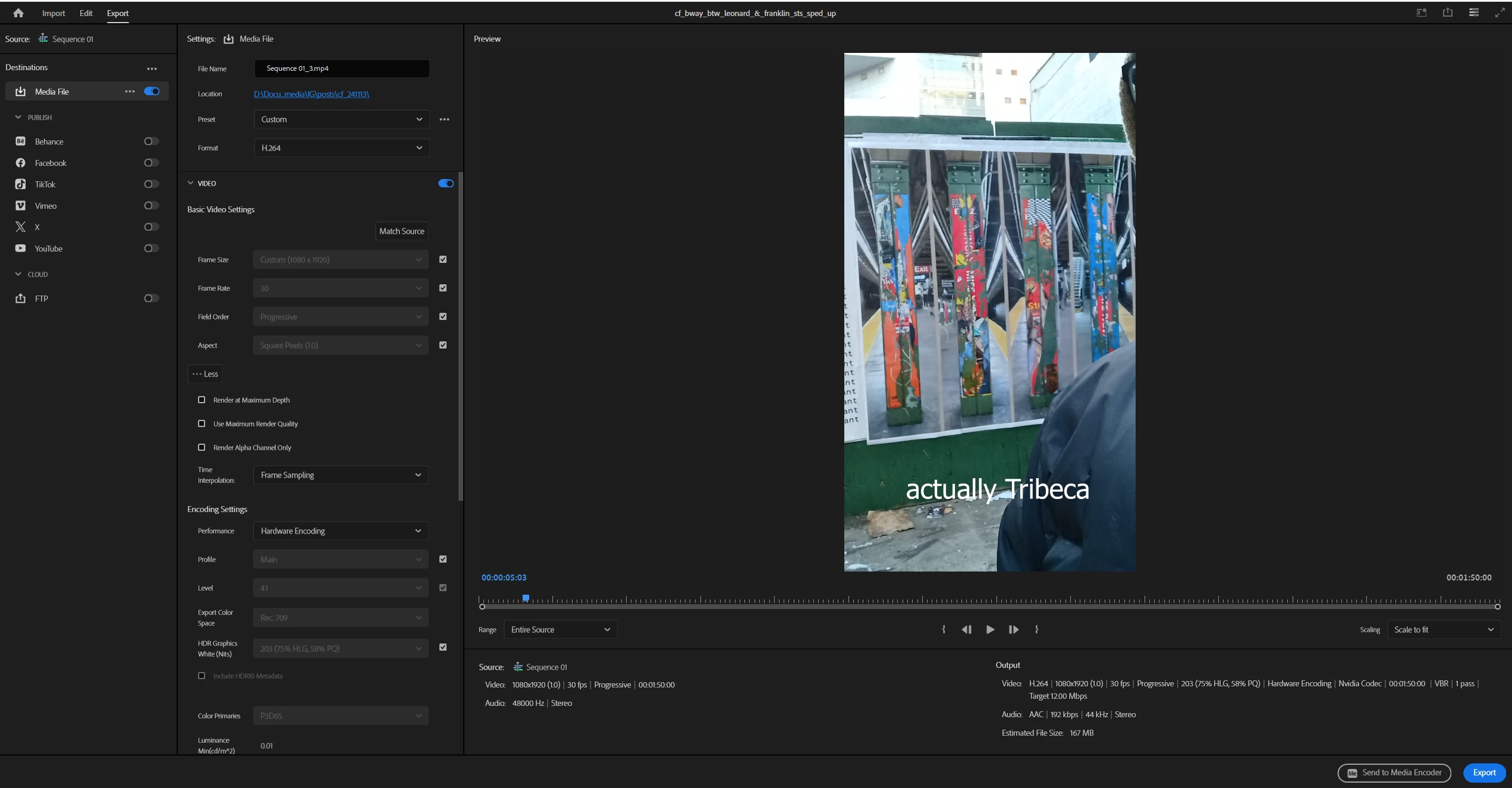


This topic has been closed for replies.
Correct answer MyerPj

Here's the info on Instagram video sizes:


  • in-feed videos
    The recommended size is 1080 x 1350 pixels, but other options include 1080 x 1080, 1080 x 608, or 1080 x 1350. The maximum file size is 4 GB. Videos longer than 60 seconds will appear as a preview in the feed, but the full video can be viewed on your profile. 
     
     
  • Reels
    The maximum size is 1080 x 1920 pixels, and the maximum file size is 4 GB. The cover photo should be 420 x 654 pixels. Reels are short, vertical videos with a maximum length of 90 seconds. 
     
     
  • Stories
    The minimum size is 1080 x 608 pixels, and the maximum size is 1080 x 1920 pixels. The maximum file size is 4 GB. Videos longer than 60 seconds will be split into multiple stories. Stories are only available for 24 hours, but you can save them to a highlight reel. 


10 replies

MyerPj
Community Expert
Community Expert
November 15, 2024

Well, glad you got it going... it get's eaiser! 🙂

Strange it was correct on your initial screenshot:


Inspiring
November 16, 2024

Yeah I see.  I dunno.  I wonder if there's another variable somewhere which if wrong would override this.  Anyway glad to know it gets easier!  

MyerPj
Community Expert
Community Expert
November 15, 2024

Can you try an experiment with nothing else selected in your export choices. You've changed something, as it is showing 'Custom'. But your sequence settings look OK and so do your export settings.

Inspiring
November 15, 2024

Thank you for responding.  I've tried so many different things I don't know where I am with my Sequence Settings and Export Settings at this point.  I want the video to be in my Feed.  So should I go to Sequence Settings and try to change the dimensions to 1080 x 1350?  When I do that I get the message below and don't know whether I should proceed.  Also, the 1080 is changed to 759, I guess to preserve the aspect ratio.  I had tried to uncheck the lock icon to decouple the 2 ratios but it didn't work.  Perhaps this is wrong and I shouldn't be making changes in the Sequence Settings but only in Export.  If there is any way to give me a step by step set of instructions on how to export for my IG feed I would be greatly appreciative.  Thank you.  


MyerPj
Community Expert
Community Expert
November 15, 2024

Don't change the preview settings. Leave them at the same size as the media, here's a good starting point. If you want to change to x1350, you'd do that in the Video portion, and not in the Preview portion.


MyerPj
Community Expert
MyerPjCommunity ExpertCorrect answer
Community Expert
November 15, 2024

Here's the info on Instagram video sizes:


  • in-feed videos
    The recommended size is 1080 x 1350 pixels, but other options include 1080 x 1080, 1080 x 608, or 1080 x 1350. The maximum file size is 4 GB. Videos longer than 60 seconds will appear as a preview in the feed, but the full video can be viewed on your profile. 
     
     
  • Reels
    The maximum size is 1080 x 1920 pixels, and the maximum file size is 4 GB. The cover photo should be 420 x 654 pixels. Reels are short, vertical videos with a maximum length of 90 seconds. 
     
     
  • Stories
    The minimum size is 1080 x 608 pixels, and the maximum size is 1080 x 1920 pixels. The maximum file size is 4 GB. Videos longer than 60 seconds will be split into multiple stories. Stories are only available for 24 hours, but you can save them to a highlight reel. 


Community Expert
November 15, 2024

Try dragging the video from the project panel onto the "New Item" icon which looks like a page with the corner turned , at the bottom of the project panel. This should create a sequence which matches your video.

Inspiring
November 15, 2024

OK, thanks.  I've done that and it looks like it just made a copy of the video, but with the layers merged to one track.  Now what do I do - just export it?  Thanks.  


Inspiring
November 15, 2024

I exported that video and got the same result.  Please see screen shot.  Is there another way to obtain a correctly sized vidoe for Instagram?  Thank you.