
pauln10313081
Participating Frequently
November 29, 2022
Answered

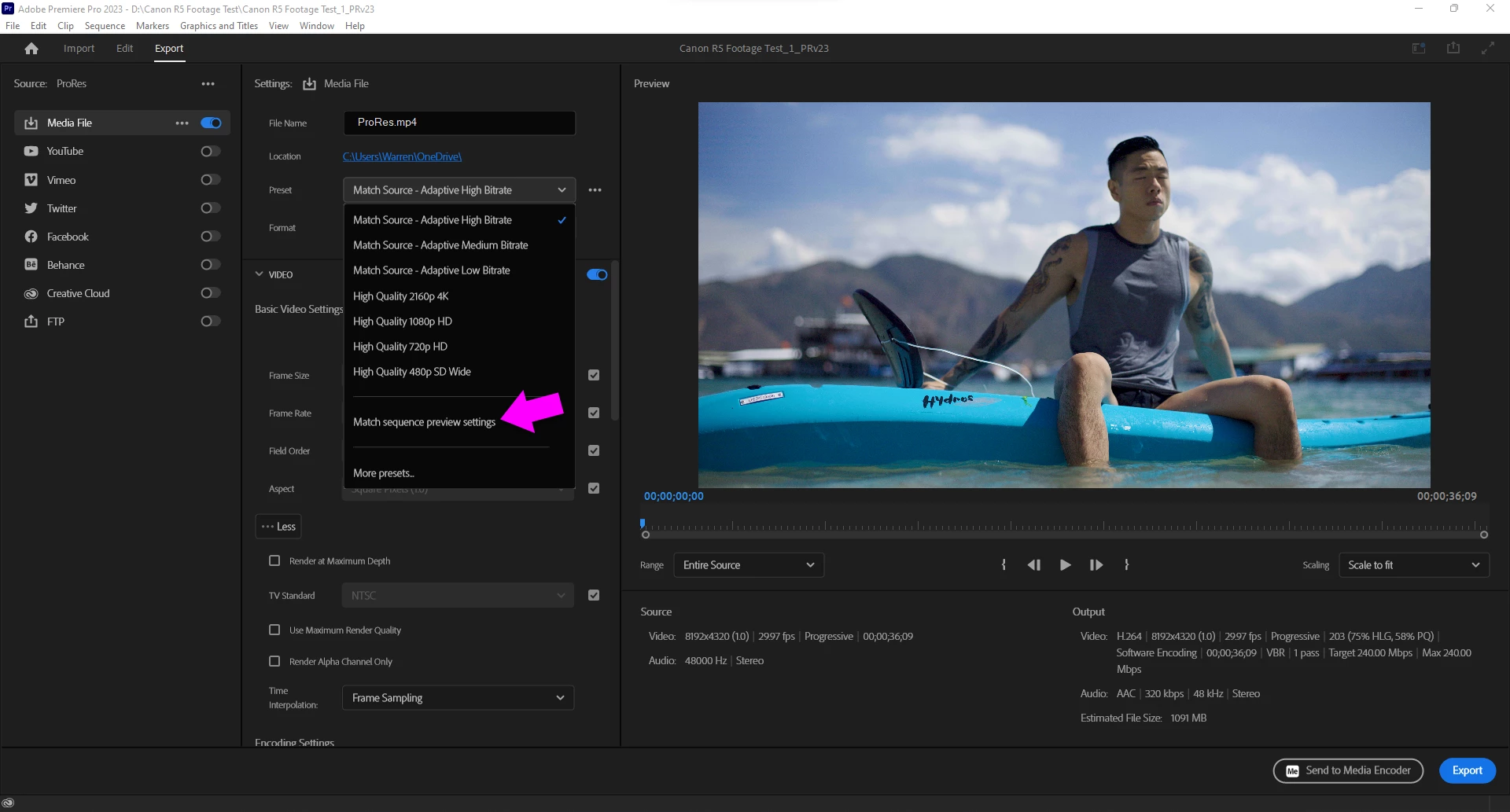
Where is "match sequence settings" in new Export window Premiere Pro 2023?

  • November 29, 2022
  • 2 replies
  • 6284 views

Match source does not match the source exactly and creates a larger file than the original by about 30%. I'm just putting a watermark on a video. What the hell happened to this box?!
This topic has been closed for replies.
Correct answer Warren Heaton

In the Preset pop-up menu, choose "Match Sequence preview settings".


2 replies

Warren Heaton
Community Expert
Warren HeatonCommunity ExpertCorrect answer
Community Expert
November 30, 2022

In the Preset pop-up menu, choose "Match Sequence preview settings".


pauln10313081
Participating Frequently
December 2, 2022

Thanks Warren, but this ballooned my original 2.3 gb file into a 43gb file. Apparently it's not the same as the old "Match Sequence Settings" checkbox.

R Neil Haugen
Legend
December 2, 2022

"Match Sequence" for exports only ever matched the raw sequence details, from the Sequence Settings ... framesize/rate and whether progressive or interlaced.


It never was designed to match bitrate, or even "notice" any clip's bitrate, as that was not a sequence item at all. That's an item per clip, yes, but not for the sequence.


For bitrate, we've always needed to choose an appropriate bitrate 'level' preset, like Adaptive Medium Bitrate, or set that manually. The results of the presets may be a bit different than before, as they may have tweaked the settings. You can check that by seeing what bitrates each preset brings up, compared to the same named preset in an earlier version.


But they are based on the same data from the sequence settings. Not clip data. I don't know how that could even be designed ... so you've got one clip that's at three times the bitrate of the next, does the app then jump the bitrate for that clip, drop it at the next edit point?


Neil


Everyone's mileage always varies ...
Kevin J. Monahan Jr.
Community Manager
Community Manager
November 29, 2022

Sorry, Paul. Do you have a sample clip to share? I can verify any issues for you.


Thanks,
Kevin

Kevin Monahan - Sr. Community and Engagement Strategist – Adobe Pro Video and Audio
pauln10313081
Participating Frequently
November 29, 2022

Hi Kevin,

It's not an issue with a clip. The previous version of PP had a check box at the top of the render window that said "Match Sequence Settings." I can't find that function in the new layout.

R Neil Haugen
Legend
November 30, 2022

That has always been just framerate and framesize, never bitrate.


Bitrate varies per preset, such as adaptive high versus low, or ProRes LT versus HQ.


And down in the settings after your chosen preset, you can modify the codec settings further.


Neil

Everyone's mileage always varies ...