niviens
Participant
November 28, 2017
Answered

Where is "render in to out"?

  • November 28, 2017
  • 1 reply
  • 26140 views

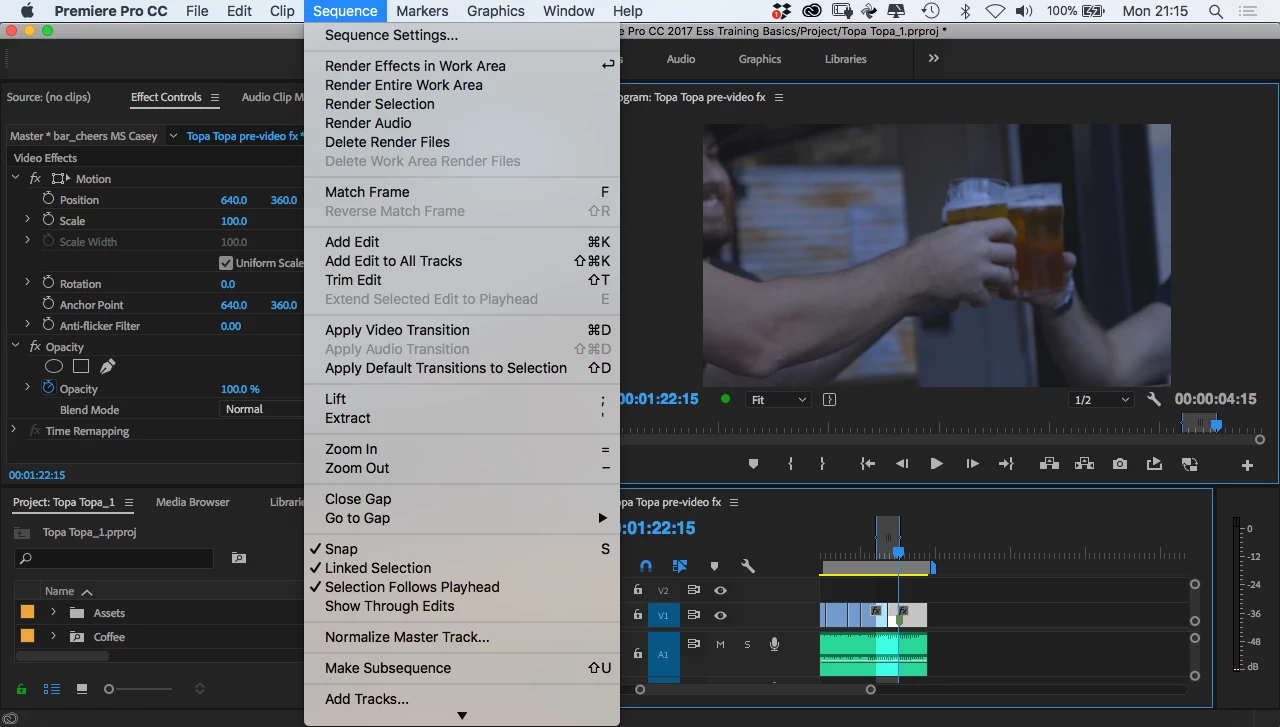
I am a Final Cut Pro user who is teaching herself Premiere Pro. According to a Lynda.com tutorial (for Premiere Pro CC 2017) that I am watching, you should render a morph cut transition in to out if you want to preview it. In the tutorial, "render in to out" is in the sequence menu toward the very top. But my copy of Premiere ProCC 2018, which I downloaded less than a week ago, has no "render in to out" command in the Sequence menu (see screen shot).

I thought that perhaps I might find a keyboard shortcut for this, in Premiere Pro CC > keyboard shortcuts, and used the search function to find the shortcut for "render in to out", but no luck.  Next I went into Help > search and entered "render in to out," but nothing. Then I looked on the web whether that command was abolished in the most recent update, but that does not seem to have been the case.

I know I can work around this by rendering a selection, but if the "in to out" command exists, I'd like to use it.

What should I do to make this happen?
Correct answer David Arbor

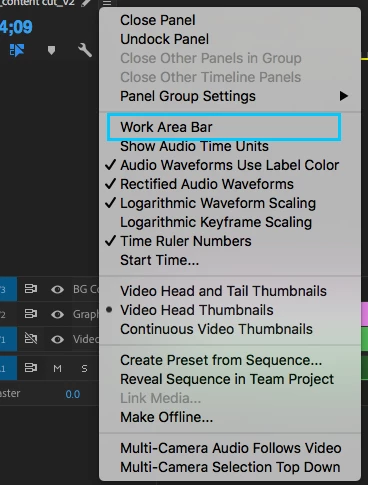
The Render In to Out option doesn't appear when you're using the Work Area bar. You must have enabled this because it's disabled by default these days. It's a relic of older versions. This is easily fixed by going to the flyout (or hamburger) menu next to your timeline's  name and unchecking "Work Area Bar." Check out the attached screenshot.

1 reply

David ArborCorrect answer
Inspiring
November 28, 2017

The Render In to Out option doesn't appear when you're using the Work Area bar. You must have enabled this because it's disabled by default these days. It's a relic of older versions. This is easily fixed by going to the flyout (or hamburger) menu next to your timeline's  name and unchecking "Work Area Bar." Check out the attached screenshot.

niviens
niviensAuthor
Participant
November 28, 2017

This worked, thank you! I would never have figured this out on my own.

And just in case someone else has that question, here's where the flyout or hamburger menu is that you mentioned.

Participant
September 29, 2019
Thank you both for this!