Inspiring
November 15, 2017
Answered

Where is the 'Lightness' Hue/Saturation control in Premiere?

  • November 15, 2017
  • 2 replies
  • 1777 views

Hi There,

I'm struggling to find/replicate a basic Hue/Saturation control (from After Effects or Photoshop) called 'Lightness' or 'Master Lightness'. It lightens the image overall but in a softer way from the controls I've found in Premiere.

I've seen lots of answers but Premiere has obviously changed since they were given. Does anyone know where I'd find the lightness control in premiere? I need to replicate a certain look.

Any pointers in the right direction would be much appreciated.

Cheers
This topic has been closed for replies.
Correct answer Meg The Dog

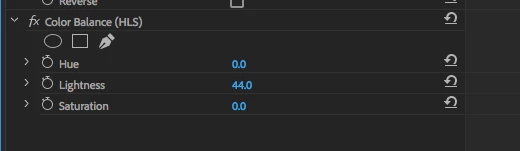
Go to Effects > Video Effects > Color Correction > Color Balance (HLS) and apply the Color Balance (HLS) effect to your clip. When you select the clip with the effect applied and go to the Effect Controls Tab, you'll see these controls:

MtD

2 replies

Inspiring
November 15, 2017

Found it by adding a 'Color Balance (HLS)' effect.

Meg The DogCorrect answer
Inspiring
November 15, 2017

Go to Effects > Video Effects > Color Correction > Color Balance (HLS) and apply the Color Balance (HLS) effect to your clip. When you select the clip with the effect applied and go to the Effect Controls Tab, you'll see these controls:

MtD

Inspiring
November 15, 2017

Sorry, must of posted at the same time - thanks for the reply.