
Participant
February 18, 2017
Answered

Whhy is each frame exporting as a seperate gif file?

  • February 18, 2017
  • 4 replies
  • 29443 views

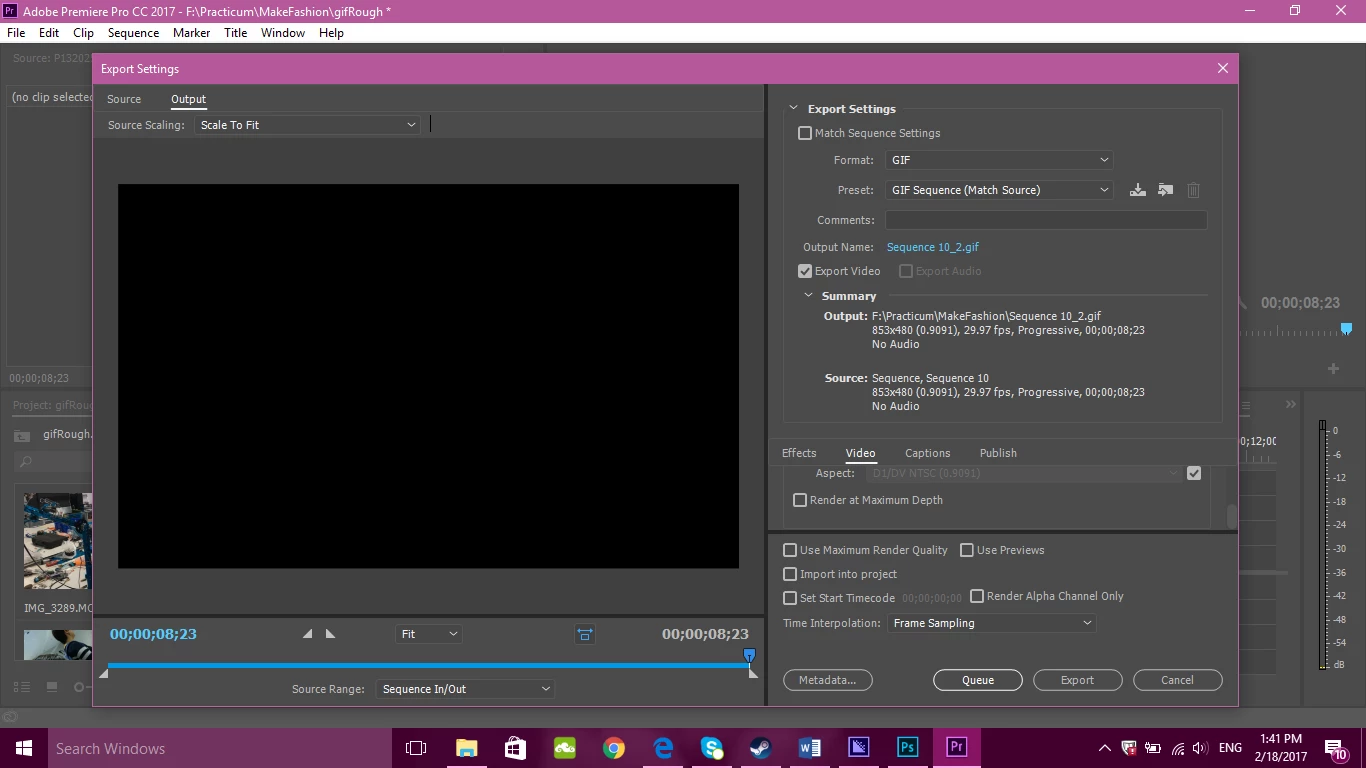
I am trying to export a gif from Premiere pro. When I do so through media encoder, instead of becoming an 8 second long gif, it is like 150 separate gif files each like a millisecond long, just showing each separate frame from the gif.

I'm guessing that the solution is really simple and I'm just a noob, but please help. Let me know if you need more information on the export settings.  Thank you!
Correct answer NathanGCS

Under your export settings on the right-hand side, select "Animated Gif" instead of "GIF"

4 replies

NathanGCS
NathanGCSCorrect answer
Participant
September 24, 2019

Under your export settings on the right-hand side, select "Animated Gif" instead of "GIF"

chrise72910838
Participant
November 11, 2019

Thanks for this! I had the same issue and couldnt figure out what the issue was. Sorted now.

Vidya Sagar
Adobe Employee
Adobe Employee
March 30, 2017

Hi Rori121,

Have you tried the step recommended by Ann Bens? Please let us know the status of the issue.

Thanks,

Vidya

Ann Bens
Community Expert
Community Expert
February 18, 2017

Uncheck Export as Sequence in the Basic Settings.

R Neil Haugen
Legend
February 18, 2017

Have you tried un-checking "Import sequences natively" in Media Encoder?

Neil

Everyone's mileage always varies ...