Participant
September 5, 2018
Answered

White Lines (Won't Go Away)

  • September 5, 2018
  • 1 reply
  • 4674 views

I am attempting to export content to IGTV, and white lines (artifacting) keep appearing along the right-hand side of the screen (image below). They dance up and down irregularly through each export (differing each time in their pattern), and sometimes disappear altogether through some parts of the video.
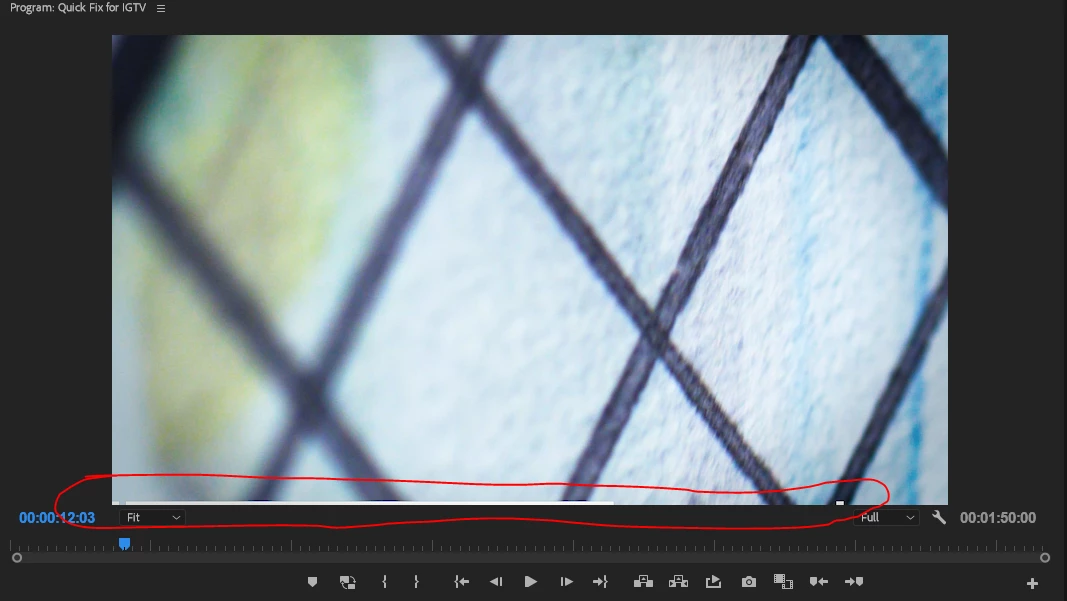
I have tried:

  • Exporting MPEG instead of h.264
  • Ensuring my resolution for the h264 codec is at an even number of lines (806 instead of 803 for example)
  • Exporting the video as horizontal instead of vertical (the example photo is this attempt at a fix)
  • Using CBR and VBR

My latest export settings are:

Basic Video Settings:

Width - 608

Height - 1080

Frame Rate - 23.976 (matches the source material)

Field Order - Progressive

Aspect - Square Pixels 1.0

NTSC

Render at Maximum Depth - UNCHECKED

Encoding Settings

Performance - Software Encoding

Profile - High

Level 4.1

Bitrate Settings

VBR, 1-pass

Target - 10

Maximum - 12

Use Maximum Render Quality - CHECKED

Use Previews - CHECKED

Sometimes it shows up in Premiere before the export, sometimes only after the export.

What am I doing wrong here? Is anyone else having this issue?

This topic has been closed for replies.
Correct answer jameslee101

I am using Lumetri.

So it appears that the problem is that for this project, I was using adjustment layers for my Lumetri coloring. Apparently, Premiere doesn't like it when you are using adjustment layers in vertical video (and yes, I did make sure they were oriented correctly). Why is this?

When I applied the same Lumetri effect I had on my adjustment layer to reach individual clip, the problem went away completely. I don't understand why this should be the case, and is really annoying, as adjustment layers are a huge help in CC-ing projects efficiently.

[edit by mod, no point in posting the same thing twice]

1 reply

Ann Bens
Community Expert
Community Expert
September 5, 2018

Use Maximum Render Quality - CHECKED

Use Previews - CHECKED

Might want to uncheck these.

Are you using Lumetri?

jameslee101AuthorCorrect answer
Participant
September 5, 2018

I am using Lumetri.

So it appears that the problem is that for this project, I was using adjustment layers for my Lumetri coloring. Apparently, Premiere doesn't like it when you are using adjustment layers in vertical video (and yes, I did make sure they were oriented correctly). Why is this?

When I applied the same Lumetri effect I had on my adjustment layer to reach individual clip, the problem went away completely. I don't understand why this should be the case, and is really annoying, as adjustment layers are a huge help in CC-ing projects efficiently.

[edit by mod, no point in posting the same thing twice]

Ann Bens
Community Expert
Community Expert
September 5, 2018