
free03!!
Inspiring
August 3, 2023
Answered

White screen in Premiere Pro when using Noise

  • August 3, 2023
  • 5 replies
  • 1082 views

URGENT!!

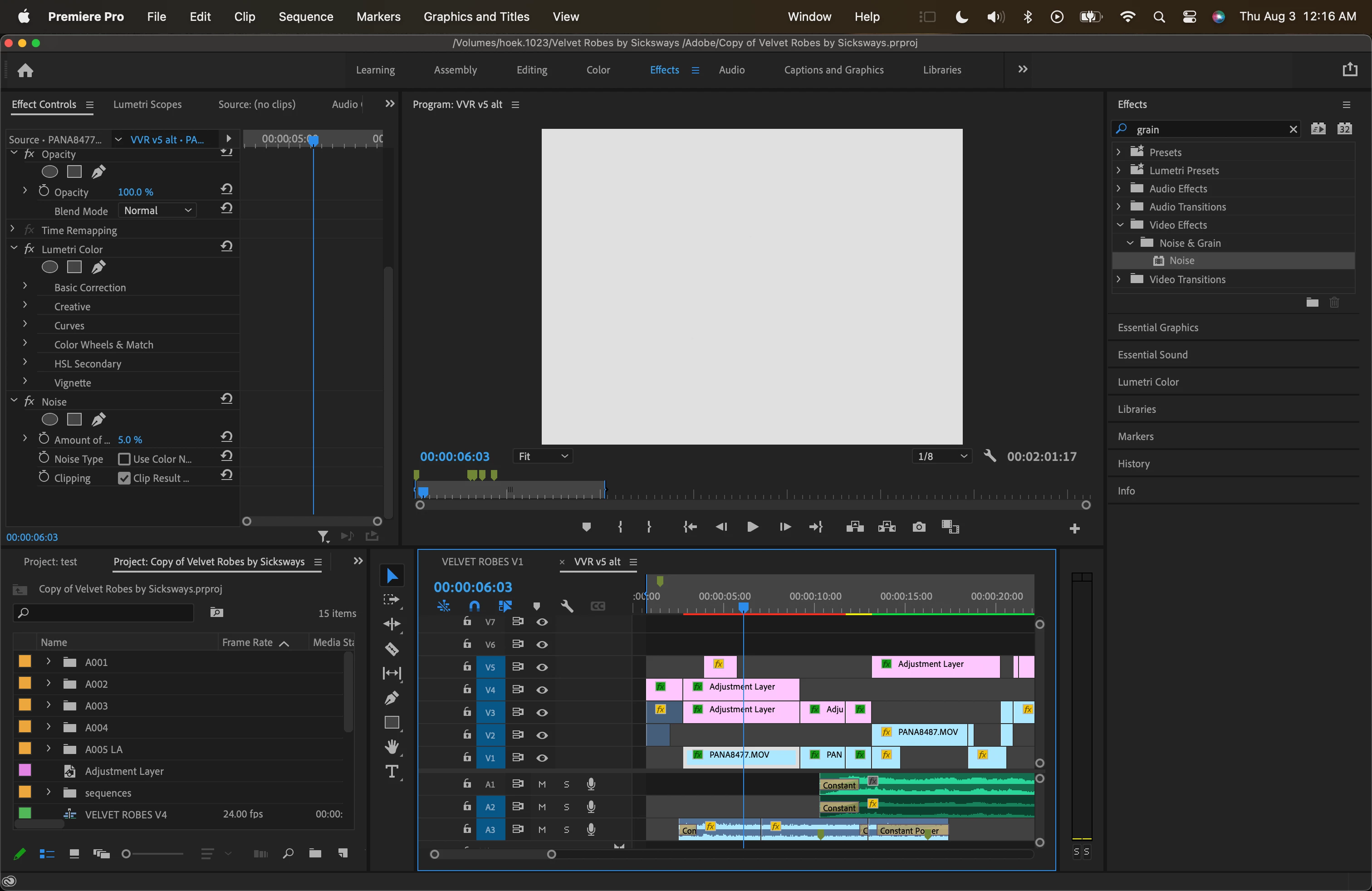
Everytime I add noise onto my footage my playback window goes white, even when I render or export it. I can't change my Rendered setting because it is greyed out. I've also made sure 'alpha' was unchecked in the settings button by the playback window. 


I've spent hours coloring, trying to finish a RUSH DELIVERY, and on my last step of adding noise/grain this bug has stopped everything. Adobe is becoming more and more obsolete with Da Vinci coming around. Why is Premiere so buggy with the new Mac's coming out??? not my first issue with Premiere on the M1


I'm using:

2021 14' Macbook Pro with Apple M1 Pro Chip

16GB of Ram

MacOS Ventura 13.3.1

Editing on Premiere Pro 22.1.2 (Build 1) 


This topic has been closed for replies.
Correct answer free03!!

I just rearrange the noise to be below my colorgrade and now it is back to normal. Thank you!! Still not sure why it does this though..

5 replies

Peru Bob
Community Expert
Community Expert
August 3, 2023

Delete the Media Cache and Media Cache files:
https://community.adobe.com/t5/premiere-pro/faq-how-to-clear-your-media-cache-in-30-seconds-in-premiere-pro-2020/m-p/11017257/thread-id/260446?page=1

Then try creating a new project and import the old one into it.

Jeff Bugbee
Community Expert
Community Expert
August 3, 2023

Guessing theres a conflict with your adjustment layers. If you disable those layers, does the noise effect work correctly?

As another test, if you open a brand new project, import a piece of footage, and apply the noise effect, does it work correctly there? If not, can you try a different piece of footage to see if you can narrow down the issue?

free03!!
free03!!Author
Inspiring
August 18, 2023

Hey! Yes it does. Apologies on the late response as I had to use a different method and didn't come back. But now I am working on a new project and again, the noise does cause it to go white. When I turn off the bottom adjustment layer tho, it does go back to normal- without the colorgrade I've done now. 

free03!!
free03!!AuthorCorrect answer
Inspiring
August 18, 2023

I just rearrange the noise to be below my colorgrade and now it is back to normal. Thank you!! Still not sure why it does this though..

Ann Bens
Community Expert
Community Expert
August 3, 2023

Which render settings are grayed out? Post screenshot.

What effects are on the Adjustment layers?