


Lex Fridman
Participant
December 1, 2019
Question

White Triangle / Arrow on All Edits in Timeline

  • December 1, 2019
  • 2 replies
  • 1226 views

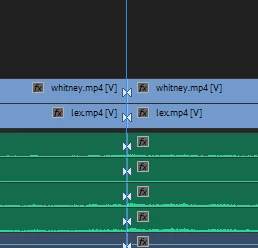
I pressed some combination of keys accidentally and now all edits (Ctrl-K or with a Razor tool) get weird triangles as show below. I google around and don't see anyone mentioning them. They seem to have no effect. They're not draggable in any way. I looked at the View menu to see if something was turned on there. Nope. It's a funny situation, but I'm hoping someone knows what these are and how to turn them off.
This topic has been closed for replies.

2 replies

R Neil Haugen
Legend
December 1, 2019

Richard is correct ... and the menu is the Timeline panel's wrench-icon Setttings menu. "Show through edits" is in there.


Neil

Everyone's mileage always varies ...
Community Expert
December 1, 2019

It's a through edit indication, lets you know that the video either side of the edit is continous. If you right click the join you should get the option to rejoin the clips. There is an option in one of the menus to turn this indication off.