Participant
November 18, 2022
Answered

Why am I having holes/breaks in this Arabic text in premiere & how to solve it?

  • November 18, 2022
  • 4 replies
  • 2390 views

Hi,
I am having holes/breaks in the Arabic text as you can see here: https://ibb.co/D7Ln4Cv
I want to solve this problem

This topic has been closed for replies.
Correct answer Ali Jaber

Yes I did. but it didn't work. T_T


Just noticed that the Tracking is set to 10, tracking will break Arabic text as the letters are connected. So, set the tracking to 0.
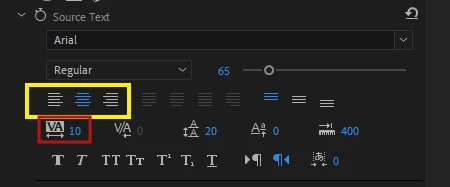
Let me know if it worked for you...

4 replies

Participant
May 10, 2023

hi! how did you solve the problem? I have the same question > <

Community Expert
May 10, 2023

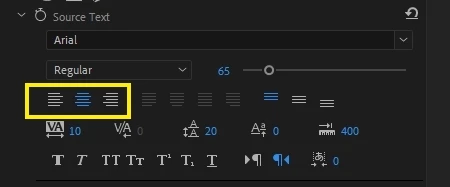
Don't use " Justified" paragraph text (in red rectangle in my previous post), use the other ones (in white).
This is still an unresolved bug (it's been years now).

Participant
May 10, 2023

Yes I did. but it didn't work. T_T

Community Expert
November 19, 2022

Currently, all justified text options of Arabic text are buggy (in red), use normal text alignment (in white):

Stan Jones
Community Expert
Community Expert
November 19, 2022

Can you paste the text in a post here? I can then test it. What font are you using?


Edit: I mistyped "text" as "test" first time! Corrected.


Stan


Stan Jones
Community Expert
Community Expert
November 19, 2022

I used some random Arabic text from the web. Almost none of it is connected, so I wonder if I need a different font.


I wondered about the ligature setting, but it only affects one character in my sample.


Stan


Participant
November 18, 2022

premiere version 2023