Participant
April 7, 2020
Question

Why are most of my photos distorted when I import them?

  • April 7, 2020
  • 2 replies
  • 716 views

I have been having this issue for a while now and whenever I research on the web I can never find anything. Can someone help me please? I included an example below of what happens occasionally when I try to import a photo (of any file type; png, jpg, etc) 
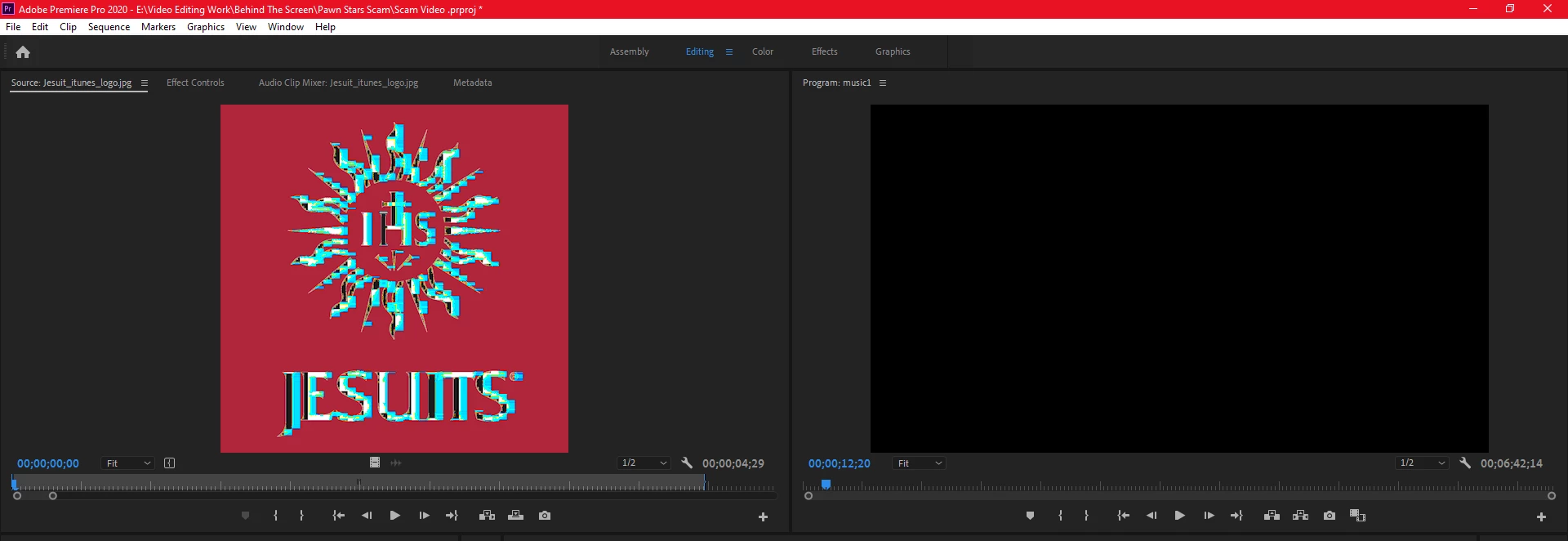
Thank You

This topic has been closed for replies.

2 replies

Peru Bob
Community Expert
Community Expert
April 16, 2020

What operating system?

What version number and build of Premiere Pro?

You may need to use the Cleaner Tool and reinstall:

https://helpx.adobe.com/creative-cloud/kb/cc-cleaner-tool-installation-problems.html

Peru Bob
Community Expert
Community Expert
April 7, 2020

Try resetting the preferences:
https://community.adobe.com/t5/Premiere-Pro/FAQ-How-to-reset-trash-preferences-in-Premiere-Pro/td-p/8236158

If that doesn't work, try resetting the Workspaces:
Reset a workspace
Reset the current workspace to return to its original, saved layout of panels.
1. Do one of the following:
• Click the Workspace menu icon and select Reset to Saved Layout.
• Choose Window > Workspace > Reset to Saved Layout.
from here:
https://helpx.adobe.com/premiere-pro/using/workspaces.html

If that doesn’t work, try updating or rolling back your graphics driver directly from the video card manufacturer’s site.

Participant
April 16, 2020

Sorry but that did not work.