


Known Participant
September 21, 2026
Answered

Why are the Standard Template 25fps sequences 23.98fps?

I could have added this as a bug.

Every time I select the 25fps template to set up my project, I find that the default sequences are 23.98.
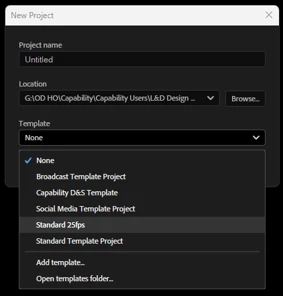


Surely they should be 25fps?
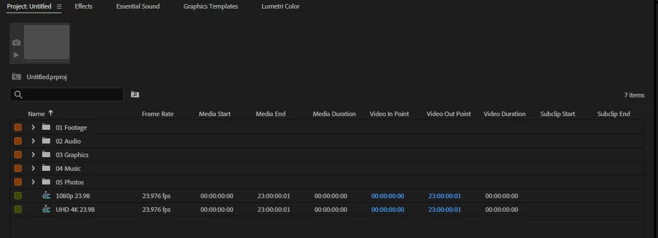
Wondering if this is by design or did someone at Adobe forget to change the settings?

Andrew

    Stan Jones
    Stan JonesCorrect answer
    Community Expert
    September 21, 2026

    ​@DinsyPiranha 

    In 26.5.0 and 25.6.6, there are only 3 included templates, and not that one. Is that one you added at some point? What PR version are you using?

    Stan

    5 replies

    MyerPj
    Community Expert
    Community Expert
    September 24, 2026

    In the New Project dialog, the pick a Template menu has an ‘Add template’ option. A template is just a project file, with anything you want in it, assets or maybe even an empty sequence with whatever settings you want in the template. Just add it and go… Just make a project, delete the default sequence, add you own empty sequence and you’ll have a template as you like it.

    Translate
    Known Participant
    September 24, 2026

    Thanks both.

    Currently using PR 26.5.1. The template appeared some versions ago without any action on my part, I assume provided by Adobe. At one point I had created a specific template, but my laptop was replaced and the custom template wasn’t carried across.

    Guess I will just have to keep on deleting the incorrect sequence.

    Translate
    Stan Jones
    Community Expert
    Community Expert
    September 24, 2026

    ​@DinsyPiranha 

    As MyerPJ says, create a new project with the template. Correct/delete the offending sequence, then File → Save as Template.

    I poked around a bit, and you can manage templates by going to the template folder. To see where yours are, File → New → Project, then click the Template drop down. Click “Open Templates Folder.”

    Then go to that location, and delete any templates you don’t want.

    The regular path on Windows is C:\Users\[user]\Documents\Adobe\Common\Assets\Project Templates

    This is part of the files that are reset when preferences are reset. Keep a backup of this whole (Adobe) folder in case you have to reset. If you have a backup of your old computer, you might be able your old template file from there. 

    Stan


    Translate
    MyerPj
    Community Expert
    Community Expert
    September 21, 2026

    The idea of the Templates are to give you an easy standardized project. Make a project just like you want it with assets and everything. Save it as a Template and use that and you’re good to go.

    Translate
    Stan Jones
    Community Expert
    Stan JonesCommunity ExpertCorrect answer
    Community Expert
    September 21, 2026

    ​@DinsyPiranha 

    In 26.5.0 and 25.6.6, there are only 3 included templates, and not that one. Is that one you added at some point? What PR version are you using?

    Stan

    Translate