Why can't I get graphic shape appearance to behave?
I'm running Premiere Pro 2017.1.2 on Windows 10 Pro 64 on an i7-4930K with 16GB of RAM and a GTX 980. It doesn't seem to make any difference if I have Mercury set to CUDA or software-only. I've had a search around and I can't find anyone else describing this problem.
I'm trying to animate the colour of shapes and I seem to be missing something fundamental. For the sake of repeatability I'm creating a new project and an AVCHD 1080i25 sequence. I then choose the Pen tool and draw a shape. It comes up with the Fill set to red and enabled, and the Stroke white and Shadow black both disabled. I can set the colour and enable the Stroke and Shadow, and that all seems fine.
However, if I click the stopwatch on Appearance to start key-framing the colours then all sorts of odd things happen. Often the settings will switch immediately back to the default red, white and black, with only the first enabled. If I try to re-enable Shadow then a blank space opens up below it in the effects panel, but nothing else happens, like this:
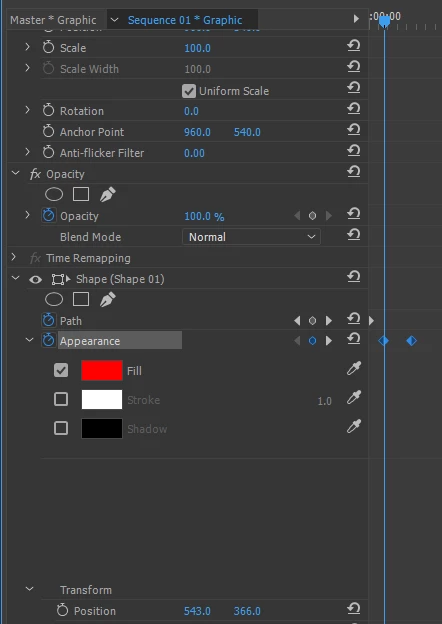
...but sometimes it doesn't. Attempting to add a second key-frame with a different Fill colour, sometimes no key-frame is produced, sometimes it is, but the colour selected never changes. Sometimes one of the next key-frame or last key-frame buttons is enabled despite there only being a single key-frame showing for the property - and nothing happens when I click it. And several times I've ended up with the stopwatch shape changing back to the inactive shape, but the colour remaining blue, like this:
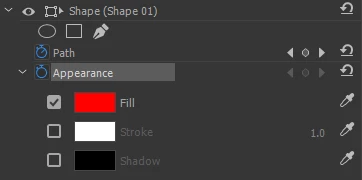
I've even found, once or twice but not very repeatably, that having added a second shape to the same graphic layer, setting a colour on the second shape changed the colour of the first, or changed the colour the first shape switched back to when clicking on the stopwatch to try and animate it.
All in all, it seems unusably buggy. But in that case I would expect to find lots of people complaining about it, and I can't. So maybe it's me.
What am I missing?
Thanks,
Tim
 AdChoices