


Participant
April 25, 2025
Question

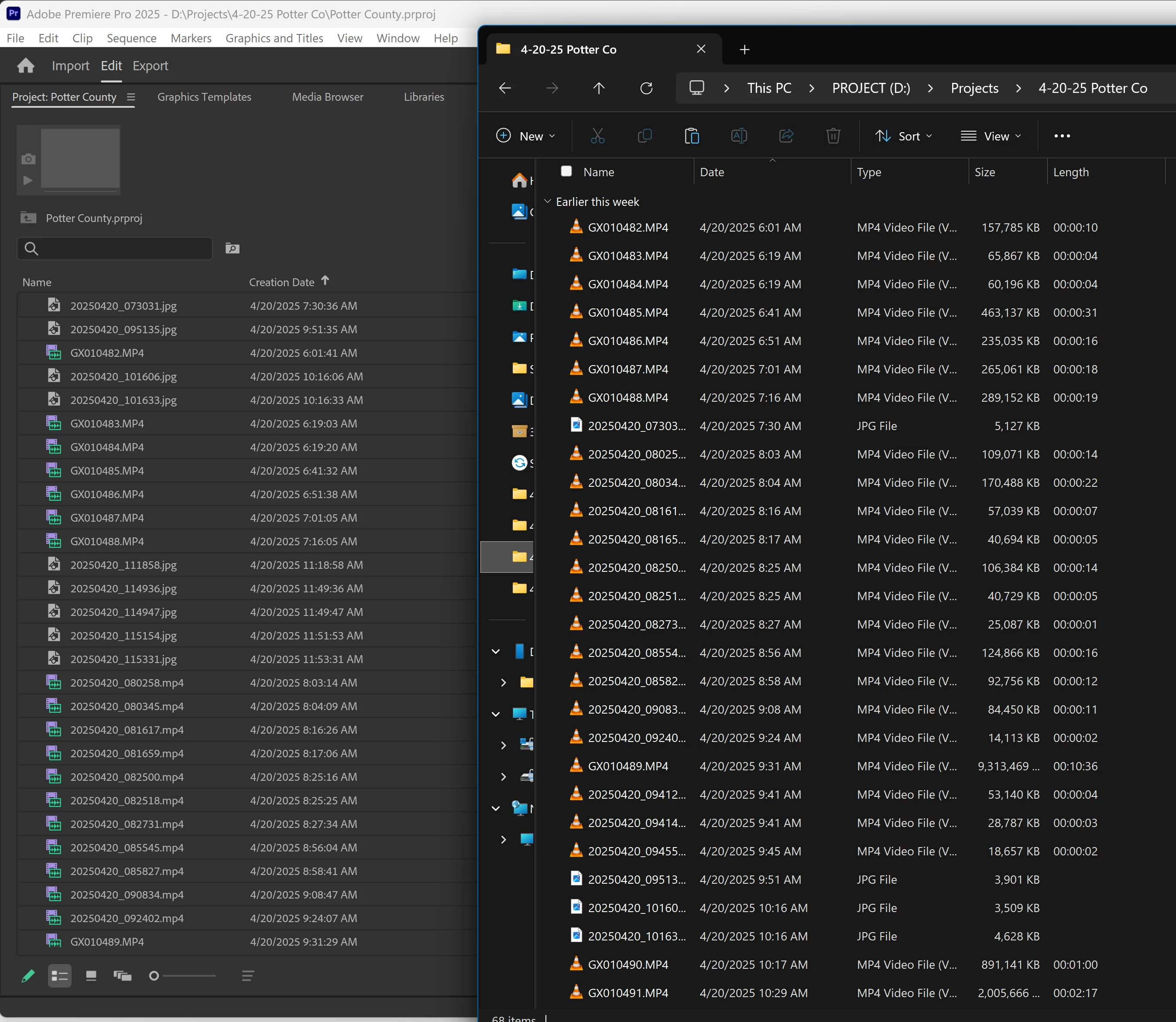
Why can't I sort my "Creation Date", on files, in order?

The media in windows explorer sorts all files by date and time. Why is adobe Premiere unable to do this function?

No matter accending or decending, files times and date are mixed in complete random order. even between media types. 

I only film from a Gopro 12 and Samsung GS23+.  


5 replies

Participant
October 12, 2026

Hi,

I saw this thread. If what you mainly need is to get GoPro and phone footage into shoot-day order in the Project panel, you can also try Project Architect:

https://exchange.adobe.com/apps/cc/204754/project-architect

More info: https://focol.io/

It does not fix Premiere’s Creation Date sort. It organizes the bins only. Files on the drive are not moved, renamed, or modified. If the hard drive is a mess, it stays that way: Project Architect only organizes the Project panel.

With Group by shoot day enabled, it simply organizes the video into day bins, so GoPro, Samsung, and the rest can sit under the same shoot day. You can also group by brand and camera model. Linked proxies stay with their master. You can preview the result first, then apply it.

Camera recognition is fairly broad, from a smartphone to the Sony Venice 2: Sony, Canon, ARRI, RED, Nikon, DJI, Blackmagic, Panasonic, Fujifilm, GoPro, and others.

DNA Check finds duplicates even if a clip was renamed, and sets them aside. Each run writes a text report, simple or detailed, for traceability.

Everything runs locally. Your media, clip names, and project structure are not uploaded. The network is only used for the license, and, if you choose it, for the camera database update.

The Pro trial lasts 7 days, with the same features as the full version. If you try it on a real project and 7 days is not enough, just say so and we can extend it.

We are mainly looking for field feedback on projects with lots of clips from several cameras. Thanks in advance if you have time to try it.

Translate
R Neil Haugen
Legend
April 25, 2025

As explained more thoroughly in that other thread, there are several different possible date fields in most metadata schemas.


"Created date" is something that actually is quite often mucked about by the OS file system of the device, and it changes the "created date" to the moment the file is brought into that device. So it can be a problematic field.


My Samsung phones do this, and after having switched phones, and importing many images/video into the new phone ... it fricking renamed ALL of them to the date of the phone switch! Now I need to get all of them off the phone, and use Bridge probably to rename the flipping files to their origination/time name. NOT happy with that!


But that sort of thing is why the devs of Premiere decided to use the calcualated field "encoded time" ... which takes the original capture time, applies the time-code change of which UTC was listed for capture, what UTC the importing computer is using, to come up with the date/time.


So when the capture device has both correct time and correct UTC for the location the images were shot, it all works fine. When the capture device isn't properly set for UTC of the shooting location ... it's off.


Every possible date field has liabilities. As noted above, even ... or especially ... the old Date Created thing.


Yea, it's a pain alright.

Translate
Everyone's mileage always varies ...
Participant
April 25, 2025

I read threw the forums on here before posting about this issue. 

I make videos from these media sources all the time and never run into this problem.

I added all the "date" fields from the metadata, to see if I could find discrepancies in the data.

I have ran into issues with copying files and the creation date issuse before, this isn't that. 

I have also synced the times and check the UTC and time codes including DST, not the problem.


If you look closely at the image I posted, you will notice the the times and file names and time information match between windows and Adobe Premiere. They do not sort. I have removed all other fields to make use it wasnt pre-sorting by file type or name. As you can see. Neither are happening. I will try a few other things when I get home and report back... 

If you gave any suggestions, let me know.

Thanks for your quick responses.


Translate
Adobe Employee
April 25, 2025

It might be a discrepancy between the Created Date and Encoded Date metadata, which could cause such issues. Please refer to this thread to understand how it might affect sorting in Premiere Pro. Hope this helps.


Thanks,

Sumeet

Translate
Kevin J. Monahan Jr.
Legend
April 25, 2025

Hi @Subsystem79,

Sorry for the anomaly. I wonder if you are sorting slightly differently in Explorer. Are multiple columns being sorted there? Not sure why you're seeing different results. Rather odd. I hope the team or a community member might be able to shed a little more light on this problem. Sorry for the hassle.


Thanks,
Kevin


Translate
Kevin Monahan - Sr. Community and Engagement Strategist – Adobe Pro Video and Audio