


Known Participant
April 26, 2026
Question

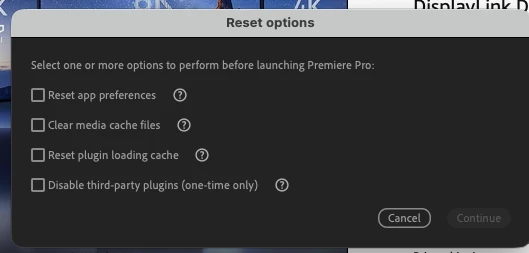
Why did Premiere show me this "Reset options" dialog popup upon open?

  • April 26, 2026
  • 2 replies
  • 22 views

Wondering if anyone can provide some insight into what this reset options window is, and why it suddenly appeared when launching Adobe Premiere Pro.


I opened Premiere the way I normally do, but instead of going straight into the app, I got this popup asking about resetting preferences, media cache, plugin cache, etc.


I canceled out of it, opened my project normally, and everything seems completely fine.


The only thing that was different during this launch was that I had just connected a few external monitors through a new Anker dock before opening Premiere.


Has anyone seen this appear randomly? Is this usually triggered by a crash, a startup key combo, hardware/display changes, or something else?


Screenshot attached.
 

    2 replies

    Warren Heaton
    Community Expert
    Community Expert
    April 26, 2026

    That usually appears by holding down any modifier key, such as Command, Option, or Shift (macOS), or Ctrl, Alt, or Shift (Windows) when launching Premiere.

    More information here:

    Premeire Pro Help > Reset preferences at launch


    Known Participant
    April 26, 2026

    Thanks Warren, I figured it was some modifier key that launched this, in general. Though I didn't have any hands on the keyboard at launch. Gotta be a quirk, in this case. Thanks for your response.

    Peru Bob
    Community Expert
    Community Expert
    April 26, 2026

    I’ve had that happen for no reason once.

    Just work as you usually do.

    It’s likely just an anomaly.

    Known Participant
    April 26, 2026

    fair enough, thanks bob. And why am I getting the feeling that Premiere has probably never been light on “quirky personality” 😂