
Participant
August 3, 2020
Answered

Why does my text become blurry when I play a video and how to fix?

  • August 3, 2020
  • 1 reply
  • 3654 views

Hi, 

I have been using Adobe Premiere Pro for about a week now and Rush for a month. I just made the switch to Pro and I notice there is a problem that jumped between both platforms. When I add text to my timeline from both platforms whether that is from the free Adobe templates of if I type my own text; the text is smooth and readible. When I start playing my video, all of a sudden the text becomes jagged and if the text is small enough, it becomes blurry and hard to read. 


I was wondering why this is happening and how I could fix this.


Thank you. 
This topic has been closed for replies.
Correct answer Joëlle Bh

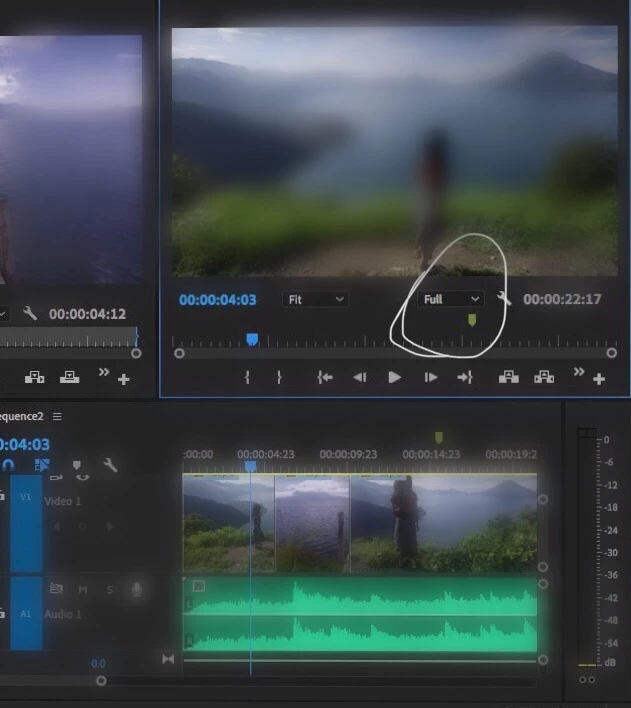
Can you please check the playback quality you're using 1/4 1/2 full? If the playback quality is low 1/4 or 1/2 you might face this issue

1 reply

Joëlle Bh
Community Expert
Joëlle BhCommunity ExpertCorrect answer
Community Expert
August 3, 2020

Can you please check the playback quality you're using 1/4 1/2 full? If the playback quality is low 1/4 or 1/2 you might face this issue

Participant
August 3, 2020

With Premier Pro the setting is on 1/2 and Adobe rush the quality was set to high. On Pro is I switched to full and I did see a much better improvement. Thank you

Participant
December 31, 2021

I did this it's Set to Full and it still plays back pixelated.