


Community Expert
February 10, 2026
Question

Why does the Premiere timeline often have so much dead space above the video tracks?

  • February 10, 2026
  • 3 replies
  • 45 views

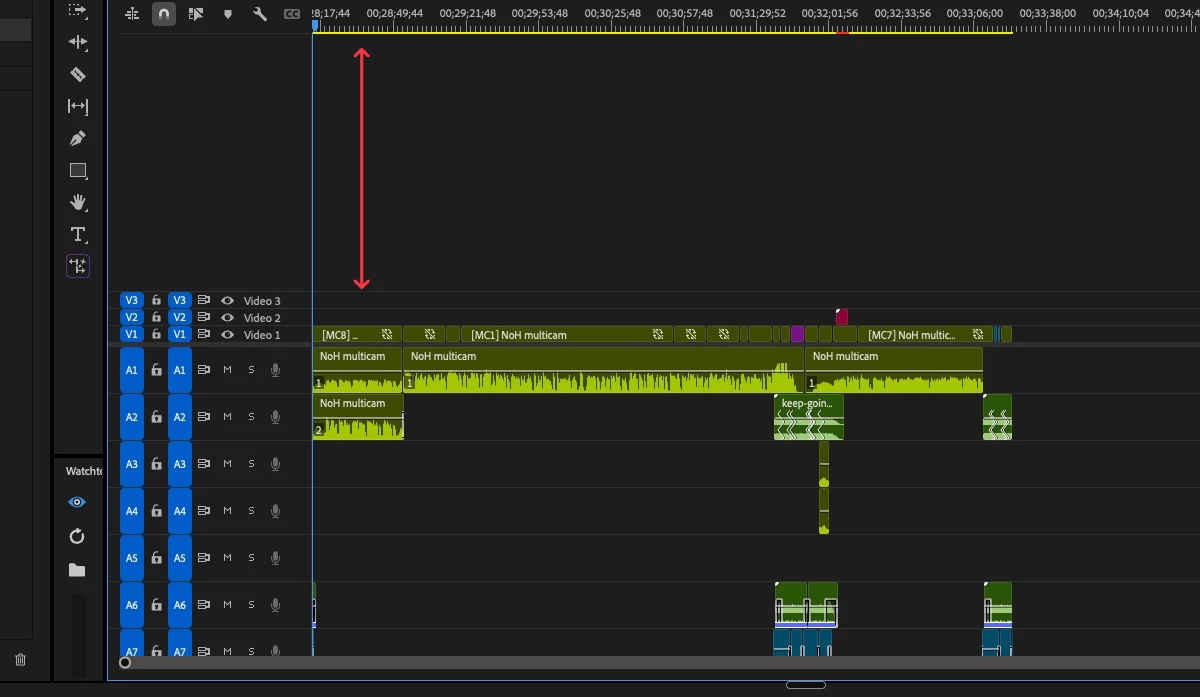
Often when you open a timeline, the timeline panel has tons of dead space above the video track.


This is a question for Engineering. Why is this? 

If you look at the image, you can see a lot of wasted space, even though the audio tracks are not visible.
 

    3 replies

    Warren Heaton
    Community Expert
    Community Expert
    February 10, 2026

    I’ve always thought it would be helpful to be able to right click the empty space above Video Tracks or below Audio Tracks and have options like Expand All Tracks to Fit Panel (track height increases to fill the empty space) and Fit Panel to Tracks (panel height decreases, anchored to the bottom, to remove the empty space)..

    Conrad_C
    Community Expert
    Community Expert
    February 10, 2026

    I’ve observed the same thing but in the opposite way: Not enough space for video tracks, lots of empty space in the audio tracks…but that’s because I usually have more video tracks and only one or two audio tracks (the opposite of your screen shot). Which leads me to a theory as to why this happens:


    The Timeline panel appears to default to a simple 50/50 height division between the video and audio track sections. Try this with an empty timeline. As you change the height of the Timeline panel, by default it maintains that 50/50 division regardless of the total height of the tracks in each section. Which means:

    • The 50/50 division will look perfect if the total height of the video tracks equals the total height of the audio tracks in your sequence.
    • The 50/50 division will seem to have unnecessary space in the video tracks if the total height of all audio tracks is larger than the total height of all video tracks.
    • The 50/50 division will seem to have unnecessary space in the audio tracks if the total height of all video tracks is larger than the total height of all audio tracks.
    • If too much space is wasted on either side, we have to go in and do that manual adjustment of the center dividing line that Ann showed.

    So the feature request would be to have Premiere apply some algorithm that auto-detects the Timeline vertical space used proportionally by audio and video tracks, and auto-split the Timeline height using the same proportions.

    Ann Bens
    Community Expert
    Community Expert
    February 10, 2026

    I, too, have often to little space.

    This request for auto-detect would mean adjusting the size of the window, the track height or both

    Ann Bens
    Community Expert
    Community Expert
    February 10, 2026

    You can make the window smaller or larger by dragging the top end of the window up or down.

    To see more audio space drag the center line up.


    Ann Bens
    Community Expert
    Community Expert
    February 10, 2026

    Ah see posters name now: guessing you already know that 😁