Bed30321077z973
Inspiring
November 7, 2023
Answered

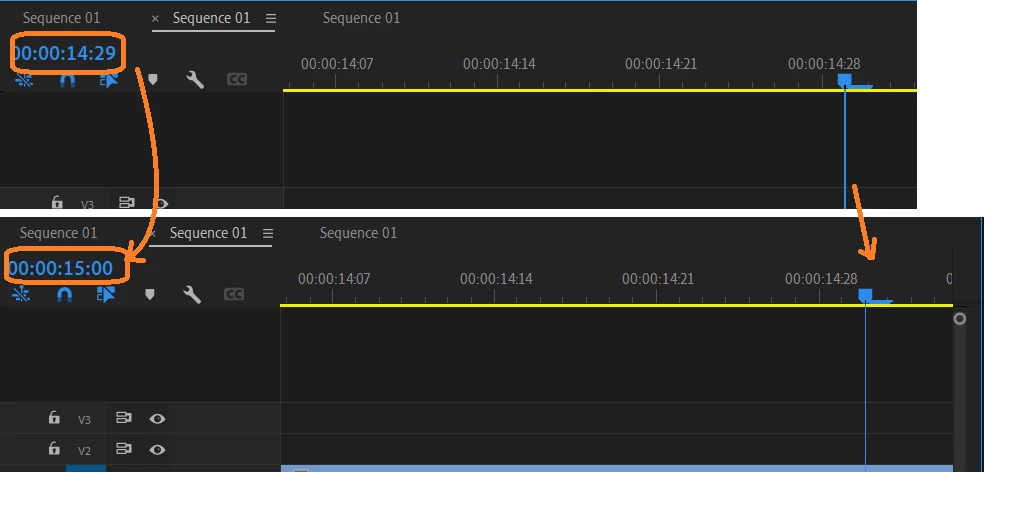
Why in Premiere pro, the tracks have miliseconds counted on a basis of 30

  • November 7, 2023
  • 2 replies
  • 1457 views

LIke this:


On instant I am at 00:00:14:29, the other instant I am instantly at second 15.

This topic has been closed for replies.
Correct answer Peru Bob

More info on timecodes:

quote

Change how timecode is displayed

You can change the timecode display format in any panel where timecode is shown in hot text.

  1. (Optional) To display timecode in audio units (Audio Samples or Milliseconds), click the panel menu button 


     in the panel desired, and select Show Audio Time Units.
  2. Ctrl-click (Windows) or Command-click (Mac OS) a hot text timecode display to toggle through any of these timecode formats that are available. The last two are available only if you select Show Audio Time Units in the panel menu.
     
    • Drop-frame timecode
    • Non-drop-frame timecode
    • Feet+Frames 16mm
    • Feet+Frames 35mm
    • Frames
    • Audio Samples
    • Milliseconds

The timecode display format for the Program Monitor (including the instance in the Trim Monitor) and Timeline panels always match one another. Changing the display format in one of these panels changes it in the other.


2 replies

Peru Bob
Community Expert
Peru BobCommunity ExpertCorrect answer
Community Expert
November 7, 2023

More info on timecodes:

quote

Change how timecode is displayed

You can change the timecode display format in any panel where timecode is shown in hot text.

  1. (Optional) To display timecode in audio units (Audio Samples or Milliseconds), click the panel menu button 


     in the panel desired, and select Show Audio Time Units.
  2. Ctrl-click (Windows) or Command-click (Mac OS) a hot text timecode display to toggle through any of these timecode formats that are available. The last two are available only if you select Show Audio Time Units in the panel menu.
     
    • Drop-frame timecode
    • Non-drop-frame timecode
    • Feet+Frames 16mm
    • Feet+Frames 35mm
    • Frames
    • Audio Samples
    • Milliseconds

The timecode display format for the Program Monitor (including the instance in the Trim Monitor) and Timeline panels always match one another. Changing the display format in one of these panels changes it in the other.


Bed30321077z973
Inspiring
December 17, 2023

Thanks, but I does not seem to have any effect is it? Since there are always only 30 frames per second?

Am I doing this right?

I got:


I want to insert a clip between one of the five points between 1:29:10 and 1:29:15 for example, but can't unfortunately.

Averdahl
Community Expert
Community Expert
November 7, 2023
quote

On instant I am at 00:00:14:29, the other instant I am instantly at second 15.


By @Bed30321077z973


It´s not milliseconds you see. What you see is timecode, in this case it is showed as Hour:Minutes:Seconds:Frames. You apperently have a timeline with a Timebase of  30. (Sequence > Sequence Settings)


So when you are at 00:00:14:29 and step forward one (1) frame the next you see is 00:00:15:00 since you can see 30 frames/second.