

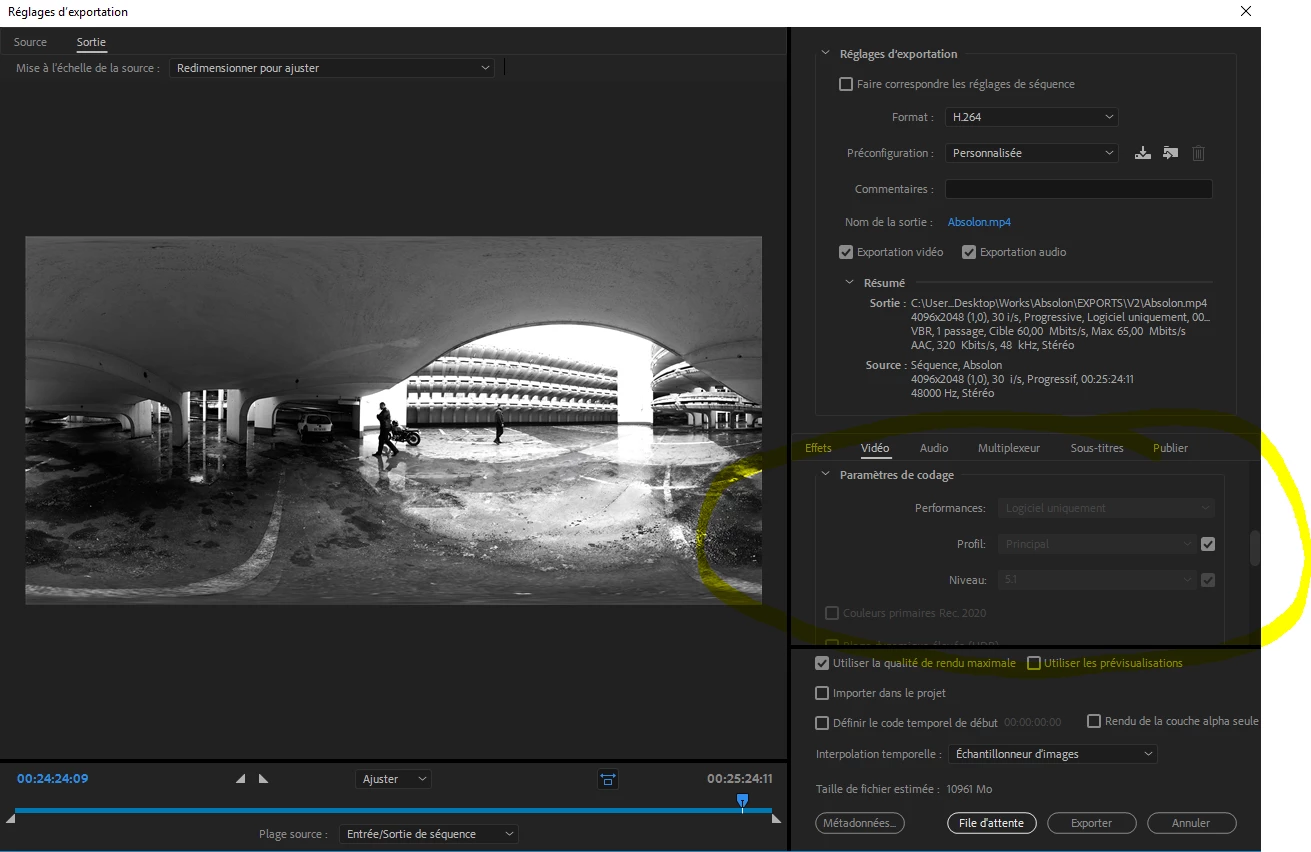
Why in the exporting settings, I can't choose CUDA ?
Hello guys,
I can't find a solution to my problem.... And I know it has been asked many times.
I am using CC2018 up to date, on a PC built by me:
- Windows 10 pro x64
- CPU: AMD Ryzen Theardripper 1950x 16
- 32gb de RAM
- GPU: Nvidia GTX 780Ti
I am trying to export a pretty big project in VR (H264 / VBR2 / 100Mbp/s) with many effects that need GPU acceleration and my premiere won't let me chose between CUDA and Software only as the menu is greyed on "software only".
In the project settings, I can chose what rendering type I want but for the encoding I can't so I am getting failure during the export because of the GPU acceleration unavailable...
I tried with some lighter settings such as VBR 1 or 45Mbp/s but I still get failure... I managed to export the video in 2 parts and then by exporting the 2 parts as one video (because the effects are now part of the footages) but it is a big waste of time.
I don't have a Integrated Graphic Processor in my machin. My Nvidia Driver is the last one, I even deleted it to reinstalled it. And Gpusniffer seems to find my GeForce 780 Ti when I run it by going into the CC 2018 folder and running a powershell windows to check it.
If you have any idea how to help me it would be awsome. If I am missing something obvious I apologize and I hope to fix it soon.
Thanks a lot,
Jules


 AdChoices