
Participant
December 7, 2019
Answered

Why is 1080p on Youtube looking so bad?

  • December 7, 2019
  • 1 reply
  • 7756 views

Hi,


I have post many videos on Youtube and Vimeo. Shooting on Sony a6000, 50mm 1.8 lens. After export (High bitrate, VBR 2 pass, Maximum render quality - PC has no problem with this), original video in PC looks so nice. On Vimeo is also very nice. But problem with Youtube. I know, there is compression..but it looks horrible than others 1080p videos. There it is - https://www.youtube.com/watch?v=Xwjf8y8rLtA  . If I tried export video to Youtube preset upscaled 4K, video looks much better - mybe very close like original video at PC. Ok, but someone could said - oh, it´s 4K video, but looks like 1080p - There is same video in 4K https://www.youtube.com/watch?v=GiARhDl_O1g&feature=youtu.be  .

So, could someone tell me, where is a problem? 🙂

Thanks very much
This topic has been closed for replies.
Correct answer Averdahl

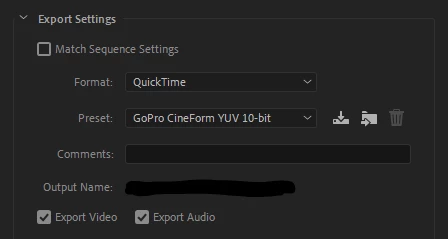
Export the video as either CineForm or ProRes using the Quicktime exporter and use that file for uploading to YouTube. Skip Maximum Render Quality as well if you don´t really know that you need it. That option can in som cases decrease the video quality.


Yes, it will take longer time to upload, but the result will be different. 🙂


1 reply

Averdahl
Community Expert
AverdahlCommunity ExpertCorrect answer
Community Expert
December 7, 2019

Export the video as either CineForm or ProRes using the Quicktime exporter and use that file for uploading to YouTube. Skip Maximum Render Quality as well if you don´t really know that you need it. That option can in som cases decrease the video quality.


Yes, it will take longer time to upload, but the result will be different. 🙂


Participant
December 7, 2019

Thanks for advice. I tried that, and you are right, it looks better 🙂