julianlllCorrect answer
Participating Frequently
January 2, 2023

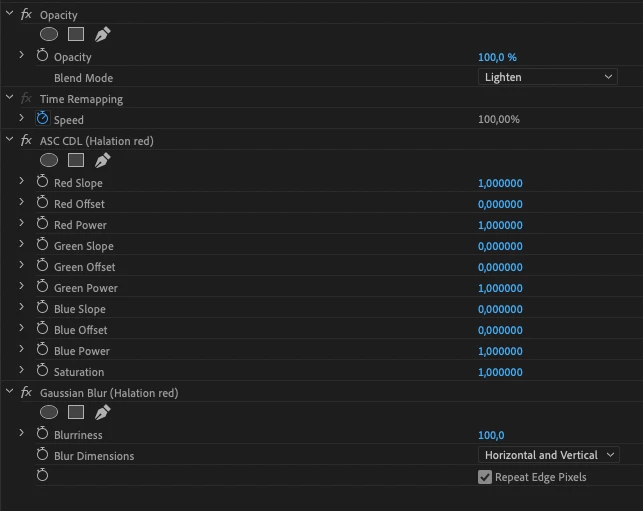
Found a way to replicate the effect and the performance is way better than channel blur. I use it for a halation effect.

Just set the slope to 0 for all channels expect the one you want to show. All other parameters are unchanged for me.


10 replies

Peru Bob
Community Expert
Community Expert
August 24, 2024
quote

WHY IS CHANNEL BLUR OBSOLETE?


By @kristenf12051508


quote

 These effects are responsible for significant project slowdowns and performance bottlenecks. In addition to all the modern options to the obsolete effects and transitions within Premiere Pro, you can also use  third-party effects, transitions, and filters.


from here:

https://community.adobe.com/t5/premiere-pro-discussions/welcome-to-premiere-pro-24-6/td-p/14816772

Translate
julianlllCorrect answer
Participating Frequently
January 2, 2023

Found a way to replicate the effect and the performance is way better than channel blur. I use it for a halation effect.

Just set the slope to 0 for all channels expect the one you want to show. All other parameters are unchanged for me.


Translate
Participant
May 26, 2024

mate you are such a legend for this, i've been looking all over and every single tutorial uses channel blur (which i'm having trouble with, its changing hte exposure of some low light shots i've tried to put it on, making them hella noisy and gross) thanks so much

Translate
Mike Dziennik
Community Expert
Community Expert
July 9, 2021

Not sure why it's obsolete since I can't see any obvious replacement. Since it's not GPU accelerated (and therefore slow) and not used commonly enough, it's likely it was deemed not critical to update.

Translate
Peru Bob
Community Expert
Community Expert
July 8, 2021

You might be able to do that in the Lumetri Color Panel.

Translate