filmwomyn
Participating Frequently
June 16, 2015
Answered

Why is garbage matte gone in CC 2015?

  • June 16, 2015
  • 13 replies
  • 85105 views

Am I missing it, but is garbage matte gone in premiere cc 2015? I don't see it anywhere. It's a real bummer if it is. 😕😕 Thanks!

    This topic has been closed for replies.
    Correct answer Colin Brougham 1

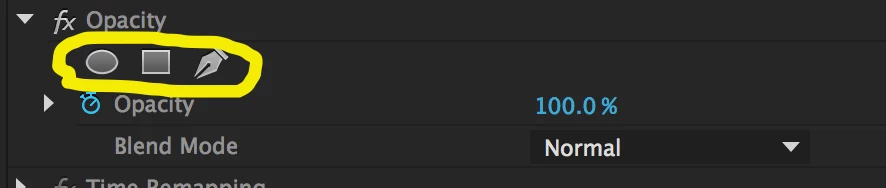
    Yes, Garbage Matte effects have been deprecated in favor of the more capable masking tools that are available with every effect in Premiere Pro. In lieu of Garbage Mattes, use the Opacity effect with a mask:
    13 replies

    Participant
    June 15, 2016

    So the task I have is to sync up some lip flaps on a piece of animation Previously this was accomplished by isolating a section of a few key frames with a garbage matte and then copy/pasting them over your video so that you can have your dialogue match your animation.
    An opacity will not allow me to copy / paste a section of a frame.

    is there a different tool I should use or is this capability gone?

    Participating Frequently
    March 26, 2016

    While the new way to mask things is nice its NOT improved, You can't animate a mask and give it any form of easing in or out, Its ONLY liner.
    How did they miss this? How do I animate something hiding or unhiding?
    Guess I'll be importing a garbage mask from an old project till they fix this.

    Ann Bens
    Community Expert
    Community Expert
    March 26, 2016

    You can animate the mask but not give it an ease in/out.

    How do I animate something hiding or unhiding?

    Not sure what you mean.

    Masking and Tracking in Premiere Pro

    lifestorygirl
    Participant
    January 30, 2016

    I'm on a one day deadline and I have just discovered garbage matte gone, come here, went back to do opacity bezier select and as soon as I click pen tool or mask shapes my working screen (video on right side) goes completely black so I can't select what I want to outline before using colour key to get rid of green screen. Help! Not sure why this is happening and man hours are being wasted figuring out these updates I didn't expect. Grrr.

    Known Participant
    January 30, 2016

    As a transition thing: You can create a CC2014 project with the Garbage Mattes applied to any clip (color bars). Open it in CC2015 and save those mattes as presets. Then you have them again.

    Here is an example: Dropbox - garbage_mattes_for_Pr_CC2015.prproj

    Participant
    November 5, 2015

    Maybe I missed it but where can I enter pixel values? I want a mask exactly at certain values which was easy with the 4 point garbage matte but kind of hard with the freehand tools we have now... Anyone suggestions?

    Ann Bens
    Community Expert
    Community Expert
    November 5, 2015

    Use the tilde key and magnify to 400.

    Participant
    October 6, 2015

    Has anyone else noticed that if you add a mask inside of the Ultra Key effect the screen starts strobing/glitching like crazy? Never had this with the garbage matte. See below...

    Adobe Premiere CC 2015 - Mask Ultra Key Glitch

    Participant
    September 20, 2015

    Once again the inept user experience team at adobe has made life harder and more frustrating for Premier users-- this time by eliminating garbage mattes. Instead of editing (making money) search for a solution, Adobe boards confirmed many others have had to waste time, by searching for a solution and learning a new method, in order to perform a once simple task. How many cumulative man hours has Adobe wasted with this single undocumented change? 1000's? Well, what ever it is it's Too Many! Adobe we hire you (by paying to use your software) to make our life easier. Usually you do, but far too often you make it more difficult. We've come to expect unintuitive interfaces that require trail and error key and click combinations that magically make a feature appear. Stupid-- but the Adobe way. Please know, when you change things and don't tell us in a straight forward way, your wasting our valuable time! Please replace your UI manager with someone who understands the importance of making your subscribers job easier. If that's too harsh for you touchy feely Cali types, at least have your team actually talk to people who edit video and other media with your products. I know it'll be for the first time, but its about time.

    shooternz
    Legend
    October 19, 2015
    Once again the inept user experience team at adobe has made life harder and more frustrating for Premier users-- this time by eliminating garbage mattes. Instead of editing (making money) search for a solution, Adobe boards confirmed many others have had to waste time, by searching for a solution and learning a new method, in order to perform a once simple task.


    Adobe responded to professionals ( feature requests) and made masking far more powerful than the weak Garbage Matte.

    It is  simple, powerful and easy to apply. It is a fixed effect on most effects and therein lies the power of the effect. for far more puproses than the crude  simplistic  Garbage Matte.


    All progress requires users to undertake the "learning curve".  


    Users like you hold us back from features we require.

    Participant
    March 30, 2018

    Could you direct me to a tut on how to use Premiere without the garbage matte?

    Known Participant
    September 9, 2015

    Just got off the phone with Adobe. To my astonishment, they owned up to the issue and acknowledged that's not the way it's supposed to work.

    The agent offered me a really quick and easy work-around. Just open a previous version of Premiere Pro (we used CC2014), import any video and create a new preset with a 4, 8 or 16 point garbage matte. When you open PP CC2015, voila - it's there (in presets) and works like a charm. Apparently, PP cc2014 & PP cc2015 share the same preset folder.

    8d5a4f32a7c7c08b18ddb50767cd40e2.png

    Known Participant
    September 9, 2015

    Using the opacity mask works great for keying. However, when I apply a transition to the clip (cross dissolve in this case), it creates a dark area where the mask is when it first hits the transition. After the transition is done, it looks fine. The issue applies to every transition I tried. Any suggestions??

    040b4d26edd172e83d422c65fd04b550.png746e6b53276f79dcbe1de04227da1516.png

    shooternz
    Legend
    September 9, 2015

    I ran into that myself.  Its a bug IMHO

    Use Key framed opacity for a transition as a workaround.

    Adobe need to seriously look at alpha and opacity issues.

    Participant
    July 22, 2015

    What's the possibility to allowing the freeform masking tool to make new mask vertices outside the frame?  Is it currently possible and I just missed it?I

    It looks like to me that I had to create the Opacity mask, then take a few extra steps to drag the bottom vertices out of the frame.  It would be much easier to just directly create the mask vertex points outside the video frame. In this case, I want to do this because I have a subject in an interview chair and want his body to extend to the last pixel at the bottom of the frame.  I guess I could zoom in and make a clean line on the last row of pixels, but that seems even more tedious.

    What say you, Adobe? Ya feel me?

    shooternz
    Legend
    July 22, 2015
    What's the possibility to allowing the freeform masking tool to make new mask vertices outside the frame?  Is it currently possible and I just missed it?I


    Change the Zoom Level in your Program Monitor ( eg 25%) and you can draw the Mask outside of the image area.

    Known Participant
    June 19, 2015

    This is a lousy idea.  Support referred me to this post.  WTH...  Did Microsoft buy Adobe?  This is the kind of goofiness Microsoft pulls.  This is not an upgrade.

    Someone please post a video on how to make a matte or us this mask feature in lieu of 4 and 8 point garbage mattes.

    Colin Brougham 1
    Adobe Employee
    Adobe Employee
    June 19, 2015

    Hi Dave,

    Not a video, but here are some quick steps:

    1. Select your clip in your sequence, and twirl open Opacity in the Effect Controls Panel.
    2. Immediately under the "Opacity" effect name, you'll see an elliptical mask, rectangular mask, and freeform (pen tool) mask.
    3. Clicking either the elliptical mask or the rectangular mask will add those masks as editable shapes in the Program Monitor; you can add or remove points and move them as needed.
    4. Clicking the freeform mask (pen) tool will allow you to draw a hard- or round-cornered mask fairly quickly. Just connect the end point to the start point and the mask will be closed. You can edit it as the others above.

    Hope that helps.

    Participant
    June 23, 2015

    Hi Colin,

    ok, I understand the use of masks under Opacity. Thats pretty cool. 

    But how am I supposed to use Opacity on a Master Clip in order to get all the movie instances updated at once?

    What I need in the end is to substitute the old "Four Point Garbage Matte" on a Master Clip.

    Can you please give me a hand on this?

    Thanks.