filmwomyn
Participating Frequently
June 16, 2015
Answered

Why is garbage matte gone in CC 2015?

  • June 16, 2015
  • 13 replies
  • 85105 views

Am I missing it, but is garbage matte gone in premiere cc 2015? I don't see it anywhere. It's a real bummer if it is. 😕😕 Thanks!

    This topic has been closed for replies.
    Correct answer Colin Brougham 1

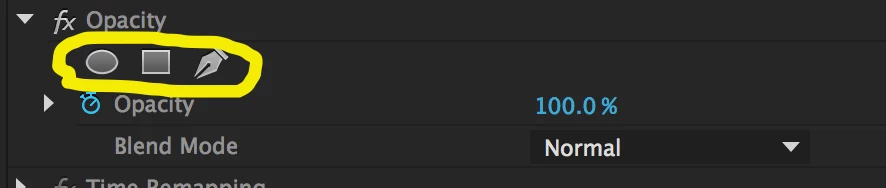
    Yes, Garbage Matte effects have been deprecated in favor of the more capable masking tools that are available with every effect in Premiere Pro. In lieu of Garbage Mattes, use the Opacity effect with a mask:
    13 replies

    Inspiring
    June 19, 2015

    As a transition thing: You can create a CC2014 project with the Garbage Mattes applied to any clip (color bars). Open it in CC2015 and save those mattes as presets. Then you have them again.

    Here is an example: Dropbox - garbage_mattes_for_Pr_CC2015.prproj

    @Colin the main #fail of removing the Garbage Mattes is that mask can (yet?) not be saved in a preset.

    Vinay Dwivedi
    Adobe Employee
    Adobe Employee
    June 29, 2015

    Thanks Joost, this workaround is working fine.

    //Vinay

    filmwomyn
    filmwomynAuthor
    Participating Frequently
    June 17, 2015

    Thank you Colin!

    Colin Brougham 1
    Adobe Employee
    Colin Brougham 1Correct answer
    Adobe Employee
    June 16, 2015

    Yes, Garbage Matte effects have been deprecated in favor of the more capable masking tools that are available with every effect in Premiere Pro. In lieu of Garbage Mattes, use the Opacity effect with a mask:

    Smoothbassman
    Participating Frequently
    June 17, 2015

    OK, I understand that the other tools were more powerful, when I need that level of detail but why take out the quickest way to do a mask? 

    The Garbage Matte's were quick down and dirty tools that we very helpful in doing quick keying.  Now it takes me more steps to do something that was so very simple to do in the past.

    So what happens to old projects that you open up that were using the old garbage matte tools?  Will the Matte's be removed or converted to Opacity masks?

    Not a smooth move guys taking this out without notice.  Like the new features, but why lose the old ones?

    shooternz
    Legend
    June 17, 2015

    The garbage matte was a quick and dirty solution as you say...but it was also somewhat under powered. It was subject to a lot of feature requests over a long time. eg feathering and inverting.

    I think thir  time had come and Adobe responded with a far more powerful feature set in masks.  They were game changing for me in a big way.