
Known Participant
July 14, 2021
Answered

Why is it that exported images don't play back flexibly?

  • July 14, 2021
  • 2 replies
  • 953 views

I have a problem with exported images, the problem is a bit difficult to explain but I want to give it a try.

When I export my edited images, the images are not very flexible.
I personally don't know how this happened.

Take the video below and pay special attention to the houses in the background.
https://youtu.be/Y2wdIckkzdg?t=895

You can see that the images are a bit choppy.
How can this be solved? I have actually tried several export files.
This topic has been closed for replies.
Correct answer Hutch Harris

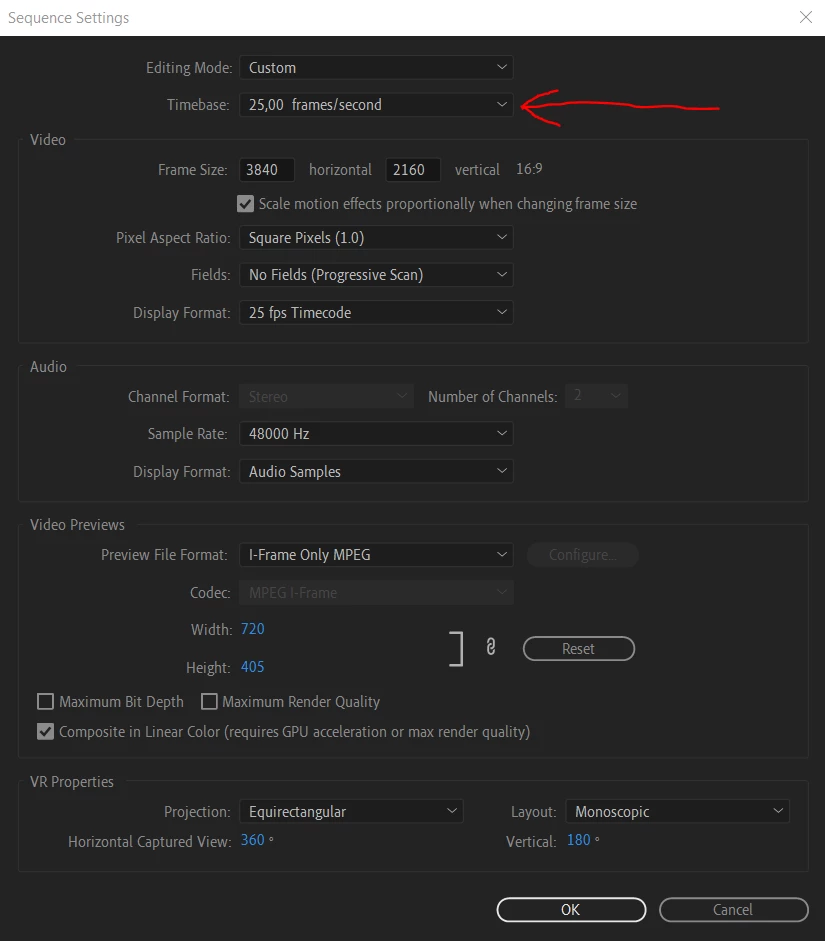
Oke, yes my original footage is 59,94, sometimes i using 2 formats 59,94 (gopro footage) and 30,00 (mobile footage)


I think i need to change this to 59,94?


To answer directly, and to solve your specific question, yes.


But, more thorough answer: you're going to have some converting going on either way. As you've stated, just by changing that value to 59.94, your 59.94 footage will look good but your 30fps footage will look stuttery.

I would actually recommend changing your timeline to 29.97 or 30. The conversion from 60fps to 30fps will look better than your mobile footage being converted from 30fps to 60fps.


Or if you absolutely must deliver in 59.94, maybe what you could try is setting your timeline to 59.94, and then changing the time remapping on your 30fps clips on that timeline to use Optical Flow instead of Frame Sampling. Might give you better results, depending on what the footage is.

2 replies

Ann Bens
Community Expert
Community Expert
July 14, 2021

Post screenshot export settings and properties of the clip.

Participating Frequently
July 14, 2021

It looks like your framerates are all mismatched. The video you linked on YouTube is encoded at 60fps, but if I step through the frames one at a time, it looks like the source video is 25fps. Make sure your sequence settings match your source settings, and then on export, make sure to check the "Match Source" checkbox by framerate.

MikeJoowAuthor
Known Participant
July 15, 2021

But when i am looking for the specifications of the original video then i see this:


As you can see the framerate is 59.94.

Participating Frequently
July 15, 2021

Can you take screenshots of your sequence settings and footage properties in Premiere? Could still be a sequence framerate mismatch, or Premiere not reading the files correctly.