Participant
December 5, 2019
Question

Why is my subtitle not showing?

  • December 5, 2019
  • 3 replies
  • 545 views

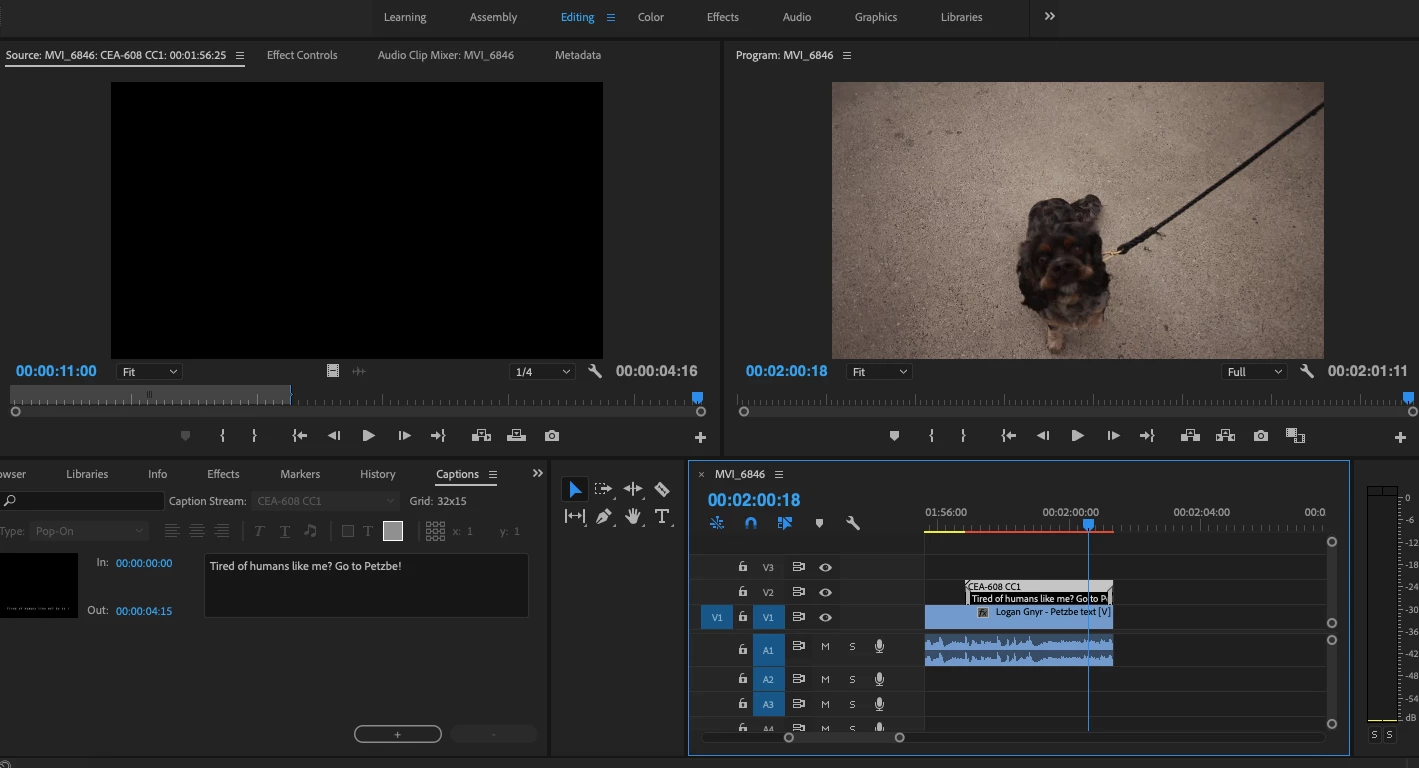
I'm using Adobe Pro CC 2018 and not sure what I've done wrong for the subtitle not to show? See screenshot. It doesn't appear at all. Appreciate the help!
This topic has been closed for replies.

3 replies

Ann Bens
Community Expert
Community Expert
December 5, 2019

Your captions need to be the same resolution as your sequence.

Also It shows 608 but guessing you need 708.

Legend
December 5, 2019

Depends what you mean by subtitle. You can use legacy titler, new titler (T tool), and (‘new captions..’) closed captions (608/708/Teletext/Open Subtitle/Australian - most with different tracks (CC1-4, Levels, Services) and Open Captions.


The last is the best bet (open captions), although it’s not perfect. Also, if you render to certain codecs (AVCI 100) the captions don’t show.


If you are using closed captions then you have to enable display of captions using wrench 🔧 in program monitor - selecting correct type (608/708 etc) and level (CC1 etc) in the settings menu just below the enable.


Community Expert
December 5, 2019

You have to activate it in Proyect panel from that little wrench with the parameters that you set when you creates the Captions

Byron.