


Participant
June 11, 2022
Answered

Why is premiere adding noise/grain to rendered video?

  • June 11, 2022
  • 5 replies
  • 1592 views

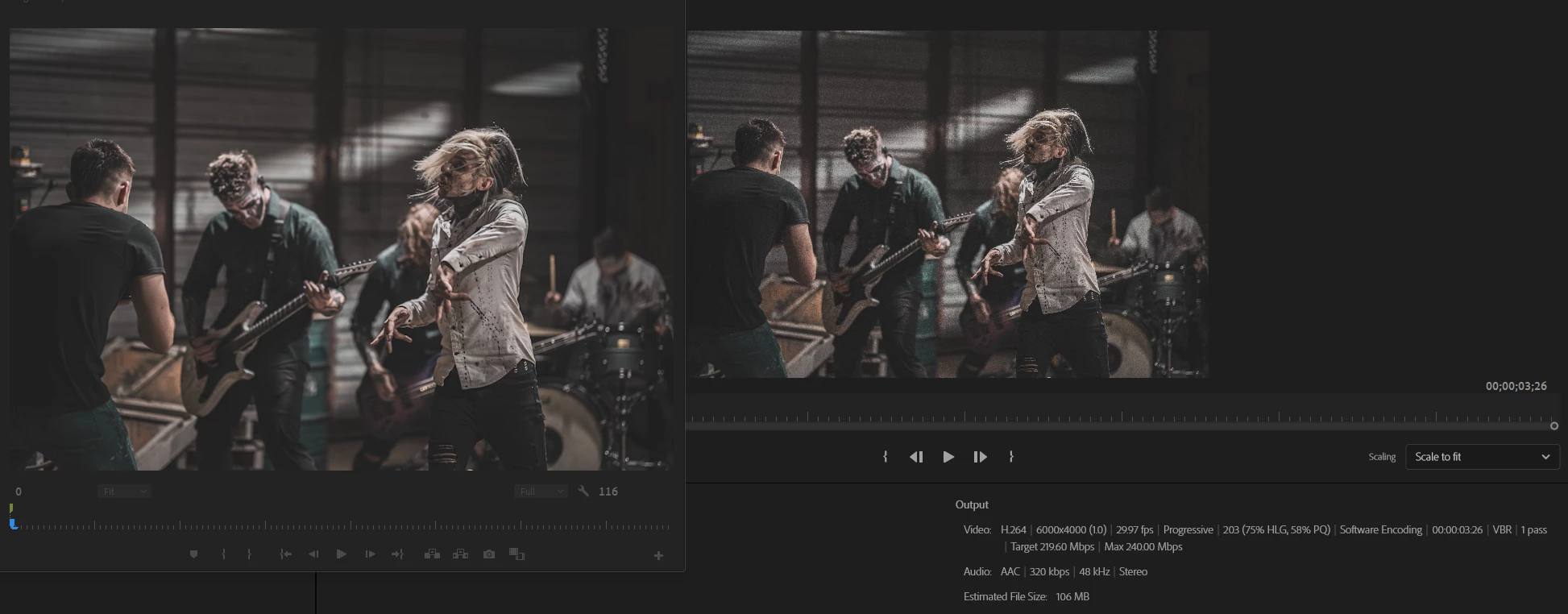
Here is a side-by-side of my clean footage in the preview, export settings, and what the renderer is doing to the footage. It compresses it and adds odd noise/grain, and I don't know how to fix this. It looks fine in the preview, but it renders all grainy.
Correct answer vicky_3238

Creating new project and adding all the objects there solved the issue for me

5 replies

vicky_3238Correct answer
Participant
July 11, 2025

Creating new project and adding all the objects there solved the issue for me

Ishan Y
Inspiring
July 17, 2025

Thanks for letting us know!

Jeff Bugbee
Community Expert
Community Expert
June 12, 2022

Grain like that looks like an effect, not an export anomaly. Are you certain there are no effects on it? Not LUTS or anything with any sort of grain effect?

Ann Bens
Community Expert
Community Expert
June 11, 2022

What is not showing in the screenshot are the source settings........

Bitrate is extremely high, most likely too high.

R Neil Haugen
Legend
June 11, 2022

6,000x4,000 ... wow, I'm not used to seeing such massive framesizes for exports. Out of curiousity, what are you doing with them?


What's the original camera frame-size?


And just doing a quick bit of mental math, target of 219Mpbs ... might be way low for that frame-size. As really, 100 to 130 is pretty minimal for UHD, and this is a TON more pixels per frame than UHD.


Neil

Everyone's mileage always varies ...
MyerPj
Community Expert
Community Expert
June 11, 2022

Try some different formats. Perhaps give ProRes a shot and see how that looks.