Why is Premiere linking the wrong clip?
I'm having trouble with Premiere consistently linking the wrong media when I open a job on a Mac after opening on a PC and vice versa. This is, as far as I can tell, happening with footage that has been replaced using Replace Footage... through the project window (often after effects renders).
There are a few different variables in this situation, there are files being opened across operating systems, but also being opened locally after being transferred from a server at work (and vice versa) - this issue seems to come up over and over unless I keep the project tied to one OS.
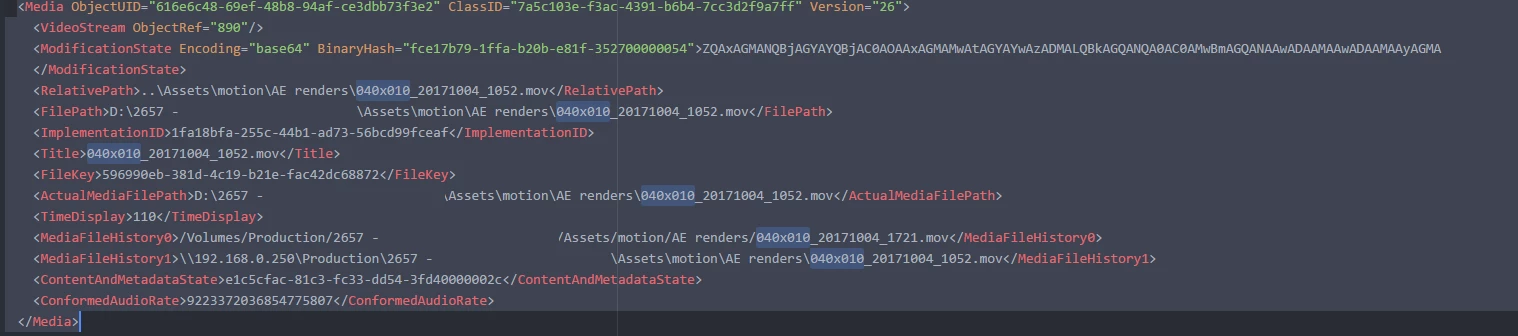
After it happened tonight I decided to look at the project file as an .xml and I have a question about what I'm seeing in that file, and if there's a simple solution that could prevent this going forward.
In the screenshot, the file linked in the RelativePath, FilePath, Title and ActualMediaFilePath tags is incorrect, but the correct file appears in the MediaFileHistory0 tag - it was rendered 7 hours after the file that is being linked to now. The paths all seem to be correct and do show that the project has been opened on 3 different computers. It was fine when I saved it from the Mac, now it is linking to the previous version of the clip ( this is pretty annoying because I replaced all of the renders in this project before packing it up)
I'd be happy to provide system information if needed when I'm back at work, and can find out some more about the way our shared storage was setup if that's helpful, but just wanted to put this out there to see if anybody else has experienced this and found a workaround.
 AdChoices