thanks for your replay.
I understood what you mean.
I'd like to explain with gpu code in detail.
prSuiteError Render(
const PrGPUFilterRenderParams* inRenderParams,
const PPixHand* inFrames,
csSDK_size_t inFrameCount,
PPixHand* outFrame)
{
...
}
As you know, I read pixel data from inFrames and apply some effects and put it to outFrame.
But I cannot apply some effects that I want because there is the problem when I read pixel data from inFrames.  .
.
This is when during preview.
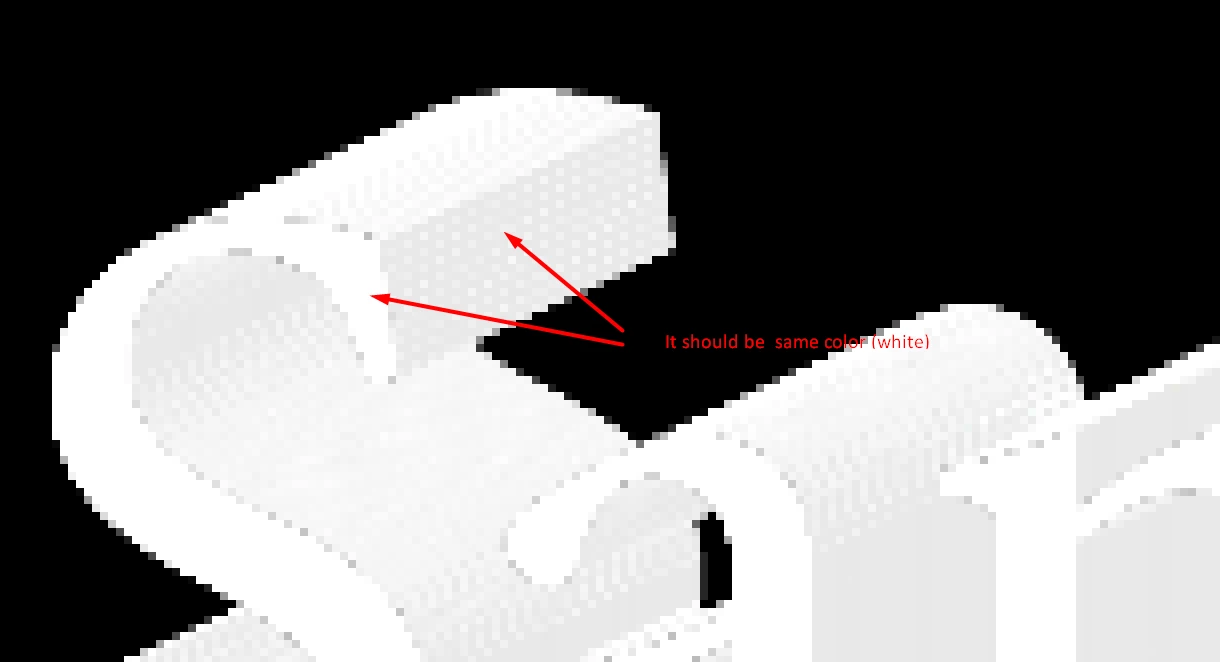
This is when not previewed.

I detect edges of the layer and expand it to specific direction to specific length. (Longshadow plugin).
But it is detected black pixels with high opacity not white color which is main color of the layer. (during preview).
How can I fix this problem?
Regards,
Igor.
While it's possible that there is some underlying Premiere bug here, to me it looks like this is just a natural result of what you're trying to do...
My guess is you're scaling some straight alpha text cutout which is likely black where alpha = 0. That's causing the interpolated pixels along the text edge in the new image to be partly black/alpha filled. (the pixels will be a weighted average of white + 100% alpha with black + 0% alpha..)
The scaling premiere uses when rendering (or when selecting High Quality Playback) will be more sophisticated and more sensitive to not blurring edges than the one during regular preview playback - but I suspect in both cases you will have this effect to an extent. (It does look like you still have some amount of this black-border effect in the original images you provided running in software mode). The GPU non-high-quality case is probably the worst just because it uses a basic bi-linear scalar (which is very fast for GPU rendering)
The solution would be to use an image with premulitplied alpha, or to set the RGB values of your entire text image to white, leaving only the areas with text to have alpha (although I suspect that might break your edge detection algorithm if it's relying on RGB values - which is not correct for an alpha image either..)
If you're not familiar here's some more material covering the issues with straight (non-premultiplied) alpha:
Premultiplied alpha – Shawn Hargreaves Blog
Texture filtering: alpha cutouts – Shawn Hargreaves Blog
Alpha Blending: To Pre or Not To Pre | NVIDIA Developer
Kyle

 AdChoices