
Participating Frequently
June 26, 2022
Answered

Why is the create button grayed out in Premiere Pro import dialogue box?

  • June 26, 2022
  • 5 replies
  • 11126 views

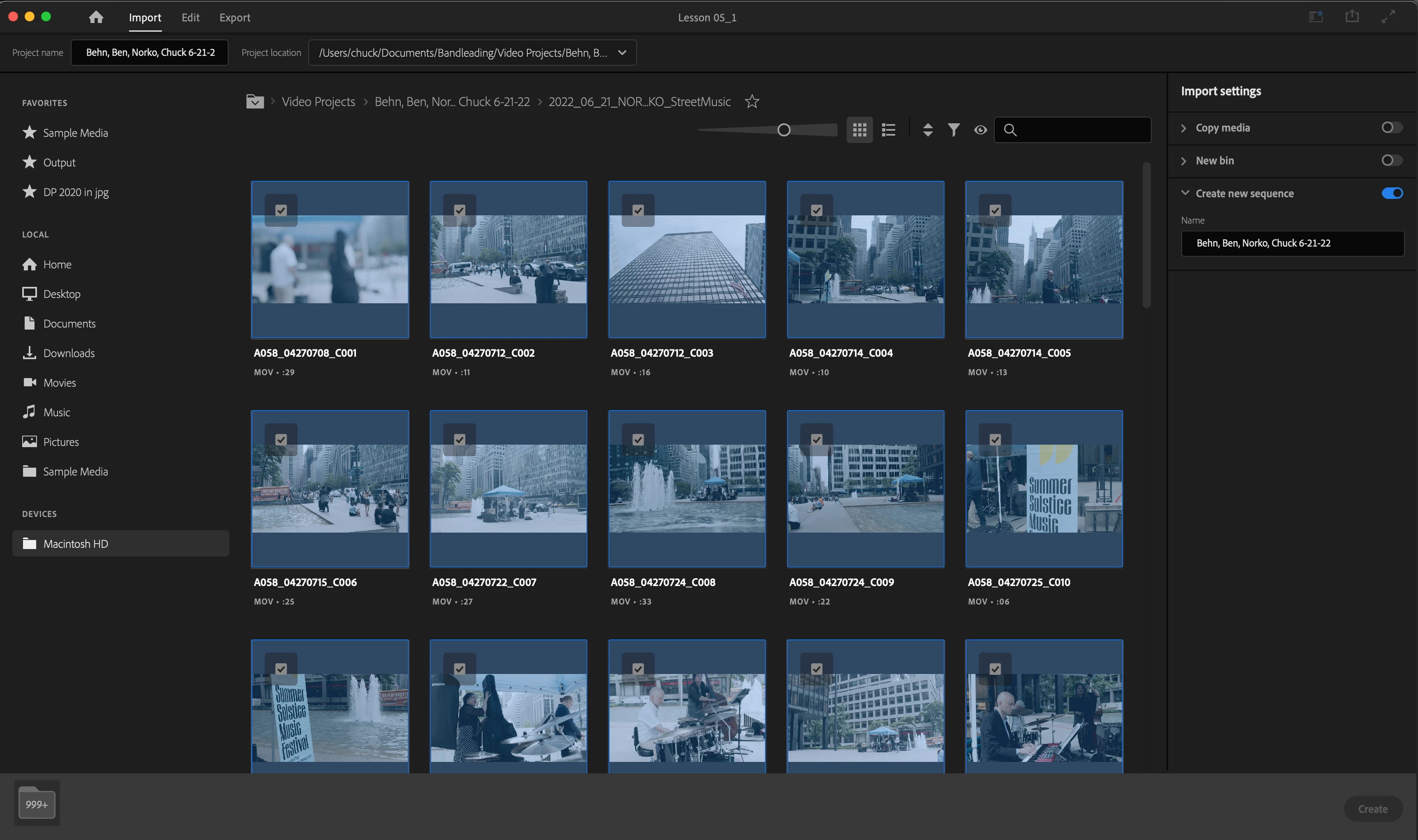
I'm trying to create a new Premiere Pro project, which apparently begins with importing media. I have what I understand to be compatible media selected, but the "create" button is grayed-out, prohibiting me from going further.


Does anyone understand why and could they suggest a remedy for this?


Thanks.
 

Correct answer R Neil Haugen

Most users bypass any importing on this 'page', as it's not necessary.


De-select everything in the middle and the right-side 'create sequence' button, so nothing is selected in the middle nor blue on the right side ...the only things done on this page are giving the project a name and location.


Now scroll down, the Create button should be available far lower right, click that, and your project opens as it used to. Now add media as you used to via the Project panel or MediaBrowser panel.


Neil

5 replies

Participant
August 23, 2024

This issue still affects newcomers. It’s a single-click to select and a double-click to browse, which can be quite annoying at first. Why use a single-click to select when there’s a large checkbox available for this purpose?

Participant
August 5, 2024

Oh man why is this still an issue 2 years later? Has to be one of the most counter-intuitive GUI experiences I've seen (and I've seen a lot in my 30 years). Quick workaround is to click and unclick the start middle top... but... Dobezy... do better hey?.

Participating Frequently
May 22, 2024

I'm having this same issue. What I figured out was that it was selecting entire folders as I was browsing instead of just browsing to what I wanted to import. So it greyed out the button because I was trying to import my entire server. And if you accidentally select your whole server, it will default to that again when you exit and try to create a project again. I had to uninstall and reinstall to clear and then I was able to start a new project by not touching any of the media to import. This seems like poor design, if nothing else.

R Neil Haugen
Legend
May 22, 2024

You can go through and "clear" all starred things, then it does as expected. It only does what it thinks you want it to do, and yea, you can star folders as well as clips.


So it's very predictable, actually. And if it ever is importing things, it's always because they're starred. Which is a condition you can control.

Everyone's mileage always varies ...
Participating Frequently
May 22, 2024

It wasn't "very" predictable. It was frustrating as I was only browsing through folders and it was selecting them automatically instead of browsing. Yes, you can clear the checked things but it is not intuitive that it is selecting them in the first place by just clicking on the folder name. What would be predictable would be having to check a box or using a "select all" checkbox. 

Participating Frequently
July 3, 2023

It's because, when browsing to the files you wanted to import, you selected a folder (checkmark, and now you want to import +999 media files.
You can see the folder icon with +999 at the left bottom.
Go back, deselect all folders etc, and then browse to your media again and re-select it.

Participant
August 6, 2023

THIS is actually the correct answer.

Participant
August 6, 2023

The other answer, while informative and helpful, does not actually answer the question, but rather provides a (possibly unnecessary) workaround.

R Neil Haugen
R Neil HaugenCorrect answer
Legend
June 26, 2022

Most users bypass any importing on this 'page', as it's not necessary.


De-select everything in the middle and the right-side 'create sequence' button, so nothing is selected in the middle nor blue on the right side ...the only things done on this page are giving the project a name and location.


Now scroll down, the Create button should be available far lower right, click that, and your project opens as it used to. Now add media as you used to via the Project panel or MediaBrowser panel.


Neil

Everyone's mileage always varies ...
Participating Frequently
June 26, 2022

Thank you, @R Neil Haugen, I really appreciate your help.


Amazing, I couldn't deselect anything, and all of the menus were grayed-out. I had to force quit. What a terrible user experience, right off the bat, before I even got started.


But once I restarted the app and followed your suggestions, everything worked as expected.

Participating Frequently
August 30, 2022

Really terrible UX indeed. I am facing the same issue, Thanks both of you for putting this conversation here so helpful. 

Accidentally I clicked by habit, a file and it freezes and the create button is greyed out. Don't know why they even included such a stupid explorer in the first place. Whenever I click a folder it keeps adding 999+ in the bottom right and the create button is greyed out again.