brittab70089477
Participant
March 2, 2018
Question

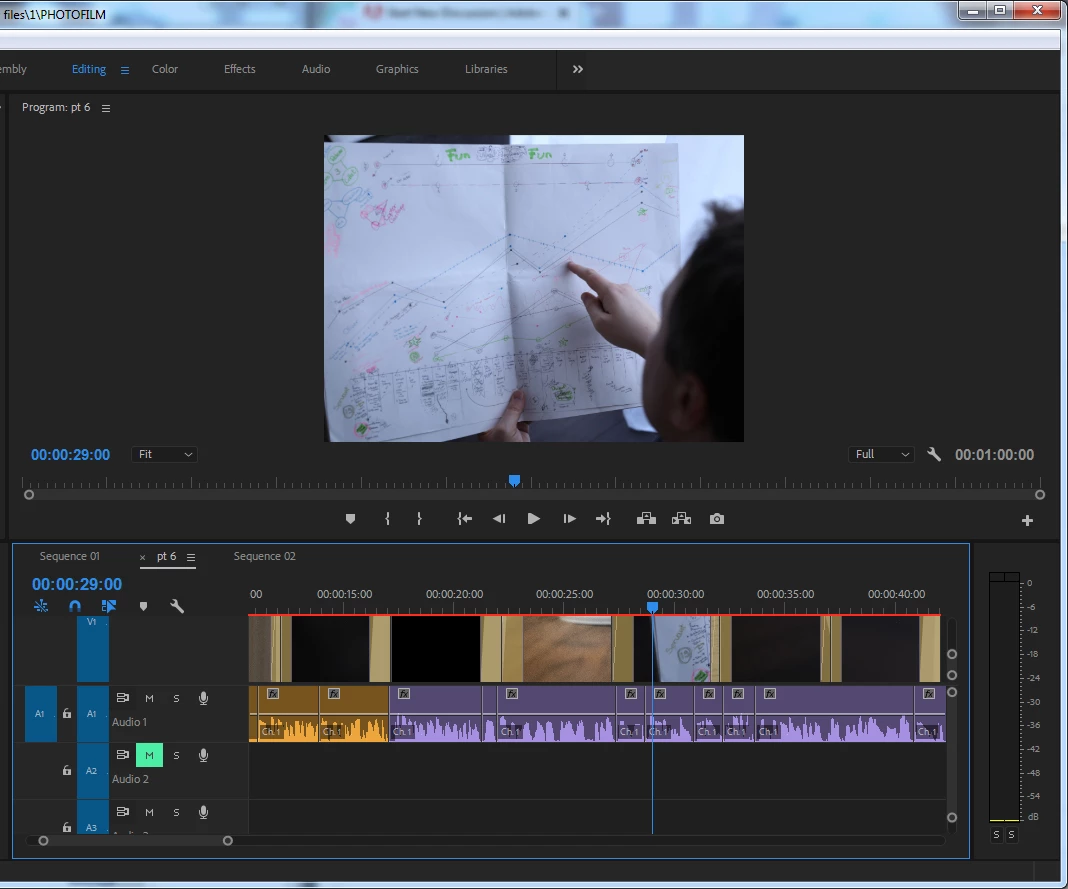
Why is timeline showing cropped area of image as a preview?

  • March 2, 2018
  • 1 reply
  • 412 views

Hi, I am new to Premiere Pro and I'm creating a photofilm.

Why can I only see tiny, cropped portions of the images in my sequence? Can someone help me correct this please?
    This topic has been closed for replies.

    1 reply

    John T Smith
    Community Expert
    Community Expert
    March 2, 2018

    Right click each picture and select

    scale to frame size

    brittab70089477
    Participant
    March 2, 2018

    I have already done that, thank you, but I mean the small previews on the timeline.

    Averdahl
    Community Expert
    Community Expert
    March 2, 2018

    Your videos frame size is larger than the frame size you have on your timeline. If you for an example place 1920x1080 footage on a timeline that is 720x576 you will see similar results, and you will see the red bar abowe your footage indicate that there is a mismatch.

    Make sure that the height and width of your timeline matches your footage and this problem goes away. Scale to frame size is not the right way to fix this.