
x3DGime
Known Participant
June 16, 2019
Answered

Why Premiere Pro in the same one project (prproj file) if I add a second sequence it purges the first one?! :o

  • June 16, 2019
  • 2 replies
  • 1314 views

Why Premiere Pro in the same one project (prproj file) if I add a second sequence it purges the first one?!

Let's start a very new project in Premiere Pro!

Create a sequence, import videos put them in that sequence, eg. make a video...

Then add a new sequence (for example from the same footage I want to make a different cut, a shorter one or just because).

Then the first sequence in the project will be emptied!!!  WHY?!

Then what's the sense to be able to create second (and third etc.) sequence in the same project file, if the newest purges the existing previous ones?!

AND as I put items on the second sequence they exactly appear in the first sequence!

It's like I have a cupboard and put in a box with tea, and when I put a new (empty) box in the cupboard, the tea disappears from the first box!    AND if I put something in the second box it also appears in the first one too!

What the hell...??? 😕😕
    This topic has been closed for replies.
    Correct answer Averdahl

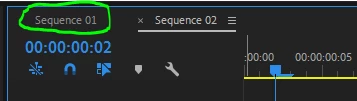
    What happens if you click on Sequence 01?

    2 replies

    khomthepreditor
    Inspiring
    June 17, 2019

    Alright, walk us through, step by step, how you're creating these sequences, importing your footage, and dropping it into the timelines. It almost sounds like you're dragging your clips from your old timeline to your new timeline instead of dragging clips from your project window or bins into your timeline.

    x3DGime
    x3DGimeAuthor
    Known Participant
    June 17, 2019

    No.

    As I wrote...

    1. I import the footage (clips, sounds, pictures etc.) into the project.

    2. I create Sequence01 in the project.

    3. I make a video (drag footage and edit etc.) in Sequence01.

    4. I export video from Sequence01.

    Until now everything is OK.

    5. Then I create a new sequence (Sequence02) in the project.  Just with this step Sequence01 immediately becomes empty!

    6. Then, when I do anything in Sequence02, everything appears also in Sequence01 exactly in the same way.  It looks like as I did in Seq01 the same thing also, but no, I did not!  I just created Seq02 and started to put and edit footage in Seq02, but did nothing with/in Seq01.

    Is it clear now?

    Legend
    June 17, 2019

    Step 5 certainly isn't normal.  You're the only one I've ever seen report something like this.

    My first guess here is observer/operator error.  Without watching you work, however, it's difficult to spot where the error might lie.

    Have you been properly trained on the software, read through the entire manual?

    x3DGime
    x3DGimeAuthor
    Known Participant
    June 16, 2019

    BTW ...   I experienced this bug just now (2019.JUN.16.SU. 23.52 CEST) in the latest Premiere Pro v13.1.2 (Build 9), and this was the first time I wanted to add a second sequence in the same project.