Participant
December 21, 2018
Answered

Why Random Glitches During Playback?
  • December 21, 2018
  • 4 replies
  • 528 views

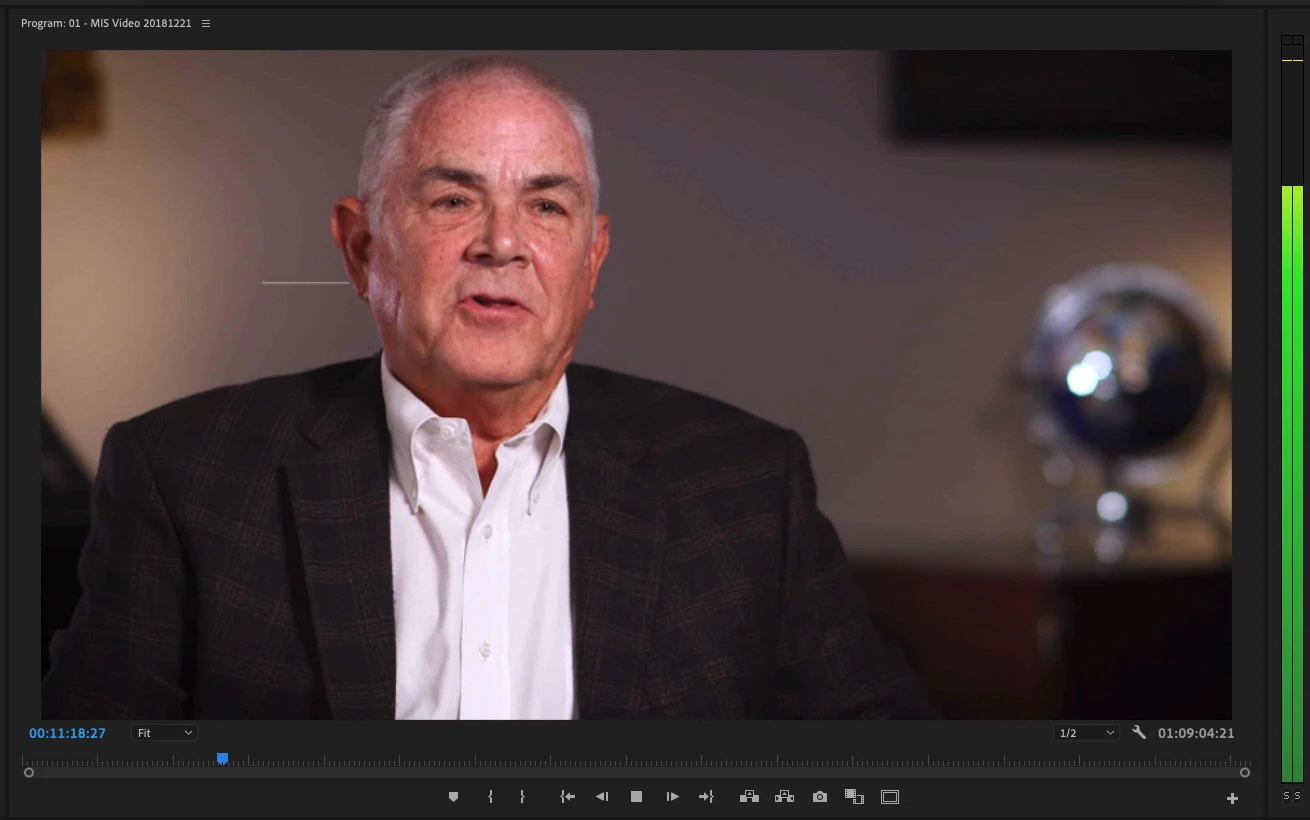
Frame above shows random White Line glitch left of man's ear (1 frame length) during playback.

Glitch does not show up when same clip is exported as H264.

They are never in the same place twice and occur at various places in the frame.

The happen at random time intervals.

Thanks for any help.

Mac Pro (Late 2013)

3 GHz 8-Core Intel Xeon E5

64 GB 1866 MHz DDR3

Dual AMD FirePro D700 6 GB

Promise Pegasus R6 Raid 5 Storage

This topic has been closed for replies.
Correct answer Kevin J. Monahan Jr.

Mark.Rigsby,

Sorry for the frustration:

Frame above shows random White Line glitch left of man's ear (1 frame length) during playback

These are tell-tale signs that your GPU(s) might be heat damaged, and if so, should be replaced. See your Apple dealer. Hopefully, your machine is still under warranty. In the future, make sure to provide maximum cooling for this device. Store it in the coolest possible area of your edit bay, ideally in an air-conditioned environment.

Glitch does not show up when same clip is exported as H264.

Right, most people say you won't see these lines if you export in Software-Only mode for GPU acceleration. However, those with this issue report that if one uses GPU processing on export, the lines return. Is that the case?

Sorry to report back on what we've seen here on the forums. Hopefully, your Apple dealer can help.

Thanks,
Kevin

4 replies

Kevin J. Monahan Jr.
Kevin J. Monahan Jr.Correct answer
Legend
December 21, 2018

Mark.Rigsby,

Sorry for the frustration:

Frame above shows random White Line glitch left of man's ear (1 frame length) during playback

These are tell-tale signs that your GPU(s) might be heat damaged, and if so, should be replaced. See your Apple dealer. Hopefully, your machine is still under warranty. In the future, make sure to provide maximum cooling for this device. Store it in the coolest possible area of your edit bay, ideally in an air-conditioned environment.

Glitch does not show up when same clip is exported as H264.

Right, most people say you won't see these lines if you export in Software-Only mode for GPU acceleration. However, those with this issue report that if one uses GPU processing on export, the lines return. Is that the case?

Sorry to report back on what we've seen here on the forums. Hopefully, your Apple dealer can help.

Thanks,
Kevin

Kevin Monahan - Sr. Community and Engagement Strategist – Adobe Pro Video and Audio
Legend
December 21, 2018

I mean happy playback live, AND product. Maybe you are maxing out the refresh rate and resolution of your monitor. I have no clue, cause this stuff is like the twilight zone half the time.

hehe.

Participant
December 21, 2018

Appreciate you input

Legend
December 21, 2018

hehe, not much help eh ? There was a thread I read here recently about the same artifact you are getting, and I think it might be called something else beside "glitch". So searching would be tough to find what that was all about and how people were dealing with it.

Plus, I'm pretty sure it happened AFTER the export. In the product. Not sure.

Don't know your source material, but maybe you can proxy down or transcode to 1080p and have a happy product ??

good luck !

Legend
December 21, 2018

If it's not coming out in the export, don't worry about it.

The built-in monitors aren't sufficient for quality control purposes anyway.  They're job in strictly content monitoring.

Legend
December 21, 2018

don't let client see your live playback. They won't understand it's not a problem.

Participant
December 21, 2018

Thanks