Participating Frequently
Dec 28, 2024 3:00 PM UTC
Answered

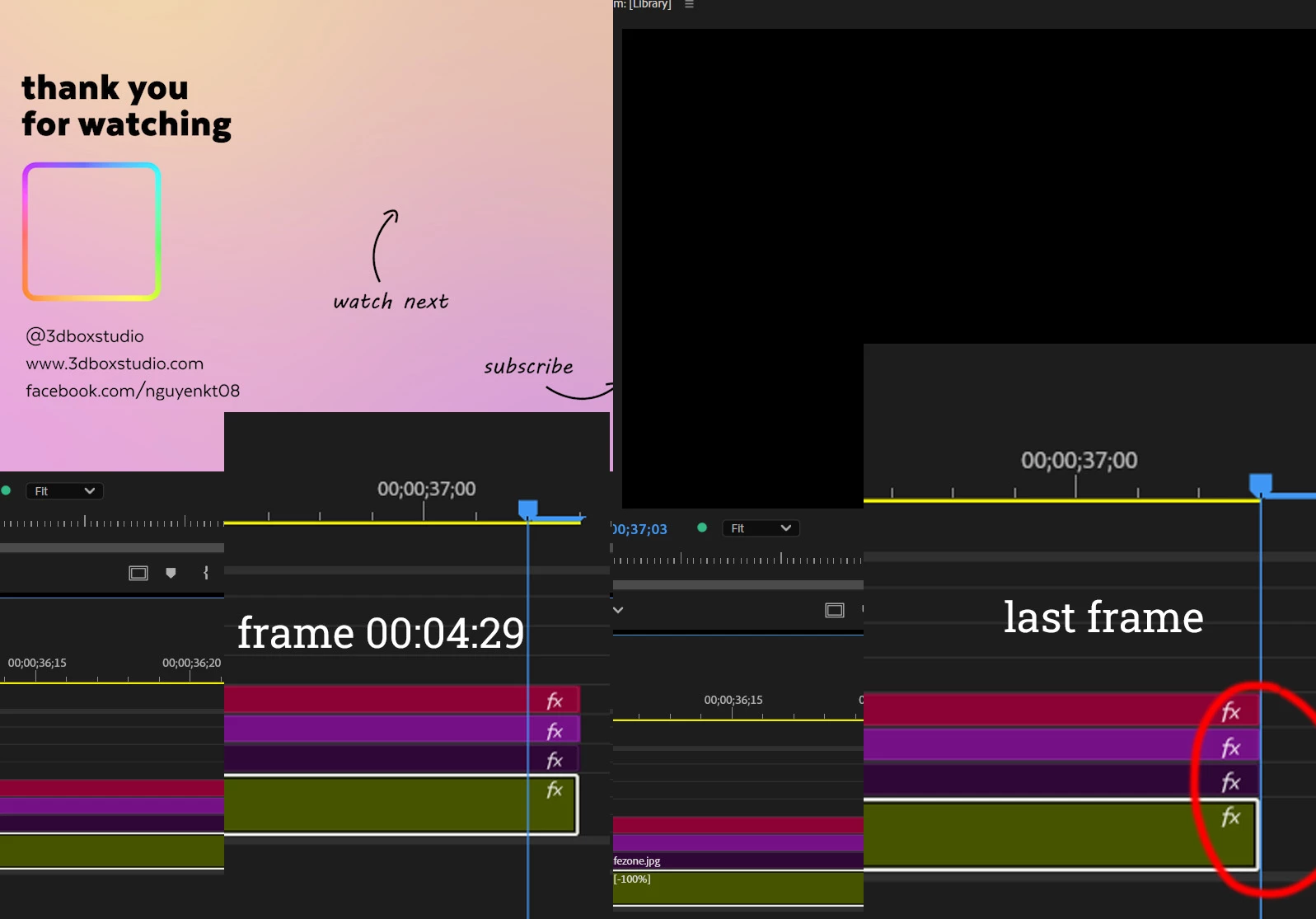
Why the last frame turn black?

Hi, I'm creating an outro of exactly 5 seconds, 30 fps

the last frame always turns black, how can I fix this?

when I trim that last black frame, the one next to it turns black, and so on @@ 

I don't want the viewers to see a black screen at the end.

R Neil Haugen
R Neil HaugenCorrect answer
Legend
Dec 28, 2024 4:53 PM UTC

This is a puzzler for many new ... and even not so new! ... folks in editing.


The CTI ... the current time indicator or "playhead" ... is never in-between frames, it is always attached to a frame.


So if the CTI is past the last frame of the last clip, it is actually showing what's 'there', which is a blank ... therefore black ... image.


To have the last one be of your image, you need to have the CTI on the last frame ... not after it.


And to export without a black frame, the CTI needs to be on the last frame also. Not after it.


By the way, there is a keyboard shortcut to go to the last frame. Different from the command to go to the end. It's really necessary to learn when to use last frame, and when to use go to end.

Everyone's mileage always varies ...

11 replies

R Neil Haugen
R Neil HaugenCorrect answer
Legend
Dec 28, 2024 4:53 PM UTC

This is a puzzler for many new ... and even not so new! ... folks in editing.


The CTI ... the current time indicator or "playhead" ... is never in-between frames, it is always attached to a frame.


So if the CTI is past the last frame of the last clip, it is actually showing what's 'there', which is a blank ... therefore black ... image.


To have the last one be of your image, you need to have the CTI on the last frame ... not after it.


And to export without a black frame, the CTI needs to be on the last frame also. Not after it.


By the way, there is a keyboard shortcut to go to the last frame. Different from the command to go to the end. It's really necessary to learn when to use last frame, and when to use go to end.

Translate
Everyone's mileage always varies ...

Community Expert
Dec 28, 2024 5:23 PM UTC

If you'd like the frame to remain for a while you may want to use the camera icon to make a still of the frame. Import it into your timeline and extend it to your desired length.

Translate
Peru Bob
Community Expert
Community Expert
Dec 28, 2024 3:36 PM UTC

Your screenshot shows your playhead at the end of the timeline. The black you see is the next frame, not the last frame of your timeline.

Zoom in to your timeline and you will see that.


See this thread:

https://community.adobe.com/t5/premiere-pro-discussions/timeline-playhead-offset/m-p/11389828


If you want to have the outro to end with the last frame showing, you will have to either do a frame hold or duplicate the last frame for the desired duration.

Translate
Participating Frequently
Dec 28, 2024 3:38 PM UTC

ok, so why when I export, the end of the video show black?

Translate
Peru Bob
Community Expert
Community Expert
Dec 28, 2024 3:47 PM UTC


The video just plays until it ends, and then no more video is displayed (a black screen).

Because Premiere Pro can't tell your media player to freeze on the last frame, you see black.

You have to set up the media player to do that.


Or if you are authoring DVDs or Blu-ray, the authoring software can have it pause on the last frame.


Translate