
Participant
July 14, 2026
Answered

Why will premiere allow me to drop video in the timeline one day, and the next day, randomly decide to take the audio part BUT NOT THE VIDEO? I have run the cache deletes and restarted both program AND software. Will you please fix this issue?

  • July 14, 2026
  • 3 replies
  • 21 views

Kindly read the question above and STOP GIVING ANSWERS NO WHERE NEAR MY QUESTION. Can we get a human involved?
 

    Correct answer Averdahl

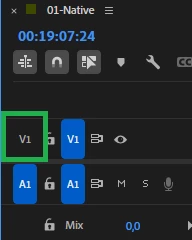
    This happens if you by mistake has clicked the most left V1. If this is like what you see in the image, only audio will be placed on the timeline when you drag video to it.

    Click it again to enable it to fix that issue.


    3 replies

    R Neil Haugen
    Legend
    July 14, 2026

    Averdahl covered it … this is a simple issue of checking Source and Track target settings on the sequence header. SO easy to miss, so … anybody will hit this now and then.

    Everyone's mileage always varies ...
    Averdahl
    Community Expert
    AverdahlCommunity ExpertCorrect answer
    Community Expert
    July 14, 2026

    This happens if you by mistake has clicked the most left V1. If this is like what you see in the image, only audio will be placed on the timeline when you drag video to it.

    Click it again to enable it to fix that issue.


    Participant
    July 14, 2026

    Is an answer forthcoming or have I been sent to the hive for discussion? Are Adobe “experts” going to be involved in this concern?


    Averdahl
    Community Expert
    Community Expert
    July 14, 2026

    See my answer abowe! :)