Inspiring
April 10, 2025
Question

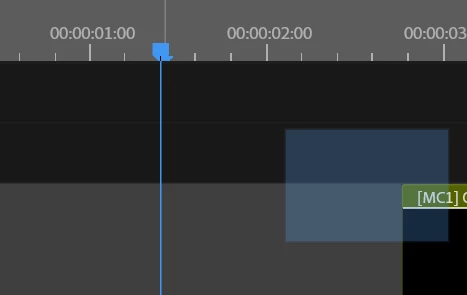
Why will this square be left on the timeline ???????????????
  • April 10, 2025
  • 2 replies
  • 371 views


Why should I constantly overload PP so that it works normally?

2 replies

Ishan Y
Inspiring
April 10, 2025

Hey Paul,

I'm sorry about the issue. Please check the Creative Cloud App for Premiere Pro updates. This might be an issue that was fixed in the most recent version. I think it would be best to install it.

If you still see the problem, please go to Window > Workspaces and select another workspace.


If that doesn't help, please go to Edit > Preferences > General (Premiere Pro > Settings > General on macOS) and let me know if unchecking the "GPU accelerated UI rendering" option and restarting the app helps fix the problem.


Thanks,

Ishan

Please tag me (@) in your replies so that it notifies me and helps me respond promptly.
Inspiring
April 13, 2025

This is the latest version. Problem in the core of Аdobe


R Neil Haugen
Legend
April 13, 2025

What is your "latest version", numbers please?


As in 25.2.0 or whatever you have. There was another patch released a few days ago, and they need to know tge specific build you're on.


"Latest" is a wasted comment, in reality. Numbers are solid information.

Everyone's mileage always varies ...
Community Expert
April 10, 2025

try to reset the preferences.

what are your system specs?

Inspiring
April 13, 2025

Recently reset, problems in updating