
Inspiring
February 6, 2017
Answered

Work Area Bar

  • February 6, 2017
  • 2 replies
  • 13523 views

I'm just trialling Premiere Pro having worked with Premiere Elements for a number of years, been watching some tutorials.. I wanted to find out a little more about the rendering options so looked up the Adobe help pages.

There's references to 'Work Area Markers' and the 'Work Area Bar', but just where are these mysterious objects! I assume it's not the area between the 'in' and 'out' markers on the Source window, nor the area used to scroll on the Timeline. I don't see any other markers!

Thanks for any help.

[title edited by mod for clarity]
    This topic has been closed for replies.
    Correct answer Meg The Dog

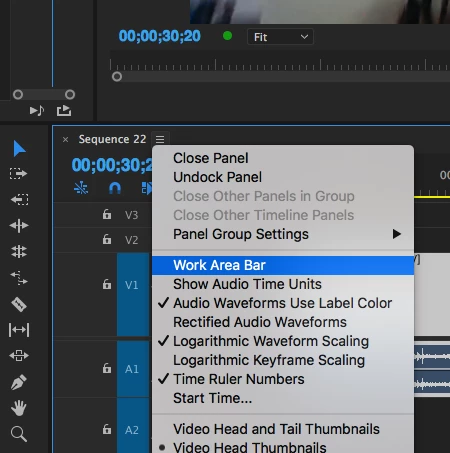
    You may need to turn on the visibility of the work area bar, click on the three stacked lines to the right of the sequence name tab and from the drop down menu choose (check) Work Area Bar to display it.

    MtD

    2 replies

    Meg The DogCorrect answer
    Inspiring
    February 6, 2017

    You may need to turn on the visibility of the work area bar, click on the three stacked lines to the right of the sequence name tab and from the drop down menu choose (check) Work Area Bar to display it.

    MtD

    Graeme Bull
    Community Expert
    Community Expert
    February 6, 2017

    You can setup markers in your sequence to be the "work area". When working on your sequence, it's the top bar of that window with the frame/time numbers/indicators. It's also possible to do the same in the encoder dialog.

    Inspiring
    February 6, 2017

    Thanks, but sadly that doesn't give me enough information!

    1. Is the Work Area bar always visible, because at the moment I can't find it!!

    2. If it's not visible, then how do I turn it on?

    I'm assuming once I find it, I'll be able to see the markers.

    This post crossed with the 2nd reply, that explains it. Great thanks for your help

    Ann Bens
    Community Expert
    Community Expert
    February 6, 2017

    I would turn off the Work Area Bar and get used to setting in and outpoints.

    This will give you more latitude in editing.