

Known Participant
September 7, 2022
Answered

Work Area bar color invisible after 22.6.1 update

  • September 7, 2022
  • 3 replies
  • 7222 views

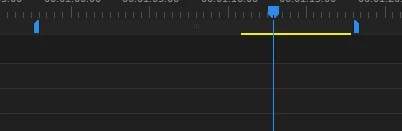
My dudes, after the 22.6.1 update, the work area bar is the same color (maybe one shade off) as the background color, it's practically invisible. Why you gotta keep breaking stuff?

 

This topic has been closed for replies.
Correct answer Mystic_kindness1549

Hi @Mystic_kindness1549,

I just took a look and it is light gray. Can you verify the version you are running? 


Thanks,
Kevin


Thanks Kevin, I upgraded to the latest PP version and yes... it's grey. Alleluia

3 replies

Participant
December 7, 2022

How the HELL does something like this get past beta testing???  Every damn time I open Premier, with some damn new version full of stuff that was FINE to begin with, screws me up.  I'm so sick of it.

Kevin-Monahan
Community Manager
Community Manager
December 8, 2022

Sorry ClarkeS. I apologize for the UI anomaly. We do have a public beta. I'm sorry no one previously caught it; it is fixed in the current beta and hopefully in an upcoming version.


Thanks,

Kevin

Kevin Monahan - Sr. Community & Engagement Strategist – Pro Video and Audio
Participant
August 1, 2023

Aug 2023, and still the work area bar is the same dark colour as the background, and difficult to see.

Wwhen will this be fixed?


Fergus H
Community Manager
Community Manager
October 27, 2022

Hi all, 

This problem will be fixed in the next version of Premiere Pro, version 23.1. The fix is already in the public beta version.

Regards,

Fergus

Known Participant
October 27, 2022

Thank you!

Inspiring
September 7, 2022

This is a user-to-user forum. If you want to report a bug you should do that at UserVoice so the Premiere team can see the issue.  https://adobe-video.uservoice.com/forums/911233-premiere-pro

Known Participant
September 7, 2022

will post there, thanks!

Participating Frequently
September 7, 2022

bogdan,


Thanks for posting about this on uservoice.


Upvoted. Just installed 22.6.2 (from 22.5); this problem is also present in current Beta 23.1.0 Build 5. I am posting a bug report there.


Here is the link to bogdan's uservoice report for everyone to upvote:

https://adobe-video.uservoice.com/forums/911233-premiere-pro/suggestions/45663898-work-area-bar-color-invisible-after-22-6-1-update


Stan


Work bar used to be color grey so you could easily see what lengthof timeline was covered by it.

Since upgrade to 22.6.1 bar is now same colour as rest of timeline BG (black) 

How do I get work bar back to same color as before ?