imcarey
Known Participant
September 29, 2017
Answered

Workflow advice for large concert project w/ multiple cameras/audio

  • September 29, 2017
  • 2 replies
  • 672 views

Hello smart people, I'm working on a video project of a 3-hour concert including 3 different cameras and 5 audio tracks (all of which are already recorded). I'm a little daunted by all this media as I begin the editing process, and am looking for some advice on efficient ways to deal with it all. A few specific questions:

- Do you recommend importing everything into one omnibus Premiere project and then splitting of edits of individual tunes from there?

- Am I better off mixing the audio into one file BEFORE importing into Premiere and syncing?

Any other general advice or resource suggestions are welcome.

Thank you!
This topic has been closed for replies.
Correct answer Richard M Knight

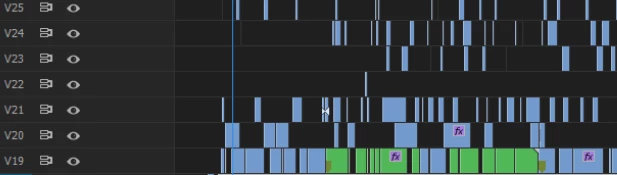
I would do the sound mix first and get that sounding correct, for a concert what you hear dictates which shot to use. If you have one, sync and put the wideshot on V1. Then sync and put the other cameras on higher tracks. Copy these in-sync tracks to V 10 to 15 and turn the tracks off, it is good to have all the material somewhere in case you need it later.  I would then go through each V2 to V5 tracks and cut out the unusable bits, focus problems, re-frames etc. You will then have a checkerboard of usable shots. The editing art now takes over just cut and delete the clips leaving you with the best angles for the music.

This is part of a similar edit I did.

I find keeping similar clips on their own track makes it easier to colour correct

2 replies

Richard M KnightCommunity ExpertCorrect answer
Community Expert
September 30, 2017

I would do the sound mix first and get that sounding correct, for a concert what you hear dictates which shot to use. If you have one, sync and put the wideshot on V1. Then sync and put the other cameras on higher tracks. Copy these in-sync tracks to V 10 to 15 and turn the tracks off, it is good to have all the material somewhere in case you need it later.  I would then go through each V2 to V5 tracks and cut out the unusable bits, focus problems, re-frames etc. You will then have a checkerboard of usable shots. The editing art now takes over just cut and delete the clips leaving you with the best angles for the music.

This is part of a similar edit I did.

I find keeping similar clips on their own track makes it easier to colour correct

R Neil Haugen
Legend
September 30, 2017

Excellent example, Richard.

Neil

Everyone's mileage always varies ...
R Neil Haugen
Legend
September 30, 2017

Let's see if Jim_Simon​ can pop in here ... he's good at this.

Neil

Everyone's mileage always varies ...