Participant
August 10, 2020
Answered

Wrong resolution in export 4K presets?

  • August 10, 2020
  • 5 replies
  • 1782 views

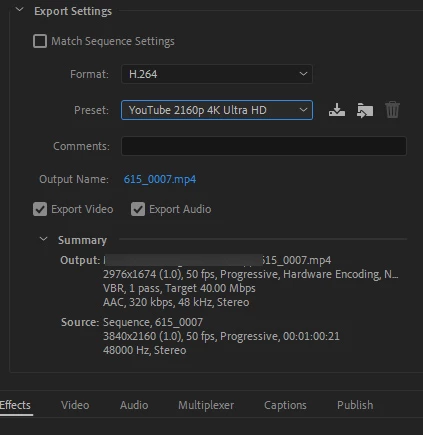
If i choose a H.264 4K preset for Youtube or Vimeo in the in export the outputfile resolution will be downscaled to 2976x1674 if i dont change it manually to 4K (3840x2160). Is there an error in the presets or does 4K on YouTube etc dont relly want full 4K?
This topic has been closed for replies.
Correct answer David Arbor

Try increasing the Profile Level to 5.2. 5.1 maxes out at 31.7 fps for 3840x2160: https://en.wikipedia.org/wiki/Advanced_Video_Coding

5 replies

David ArborCorrect answer
Inspiring
August 10, 2020

Try increasing the Profile Level to 5.2. 5.1 maxes out at 31.7 fps for 3840x2160: https://en.wikipedia.org/wiki/Advanced_Video_Coding

Participant
August 12, 2020

Thanks that solved the problem!

Legend
August 10, 2020

I have discovered exactly the same thing on my system, as well. It turned out that it's the limitation of Adobe's (or rather MainConcept's) implementation of the NVENC hardware encoder. 3k is the maximum that one can do for H.264 and still have hardware encoding even though NVENC technically supports true 4k. If you force 3840x2160, the encoder will default to software-only encoding.

Legend
August 10, 2020

so this is a 3rd party plug-in???

Legend
August 10, 2020

No. It's just that Adobe never really had an in-house H.264 or HEVC encoder to begin with. In fact, all of Premiere Pro's MPEG encoders (this, by extension, includes the H.264 and HEVC encoders) are actually sourced or licensed from MainConcept.

Inspiring
August 10, 2020

Can you post a larger screenshot showing the Video tab? Is the checkbox next to the width and height checked? If you click the big "Match Source" button does that fix this?


Also, what happens if you queue this file to Adobe Media Encoder and apply the same preset there?

Ann Bens
Community Expert
Community Expert
August 10, 2020

That is an odd resolution.

Might want to start with resetting preferences.

FAQ: How to reset (trash) preferences.

Ann Bens
Community Expert
Community Expert
August 10, 2020

...so we dont have to download unknown files: we help you, you help us. Thanks!