

zecarpio
Participating Frequently
February 15, 2022
Answered

Wrong timecodes when exporting SRT files (+36 sec.)

  • February 15, 2022
  • 3 replies
  • 4398 views

Hello there,


Am I the only one struggling with exporting SRT files with the wrong timecodes since Premiere Pro 2022 was released?


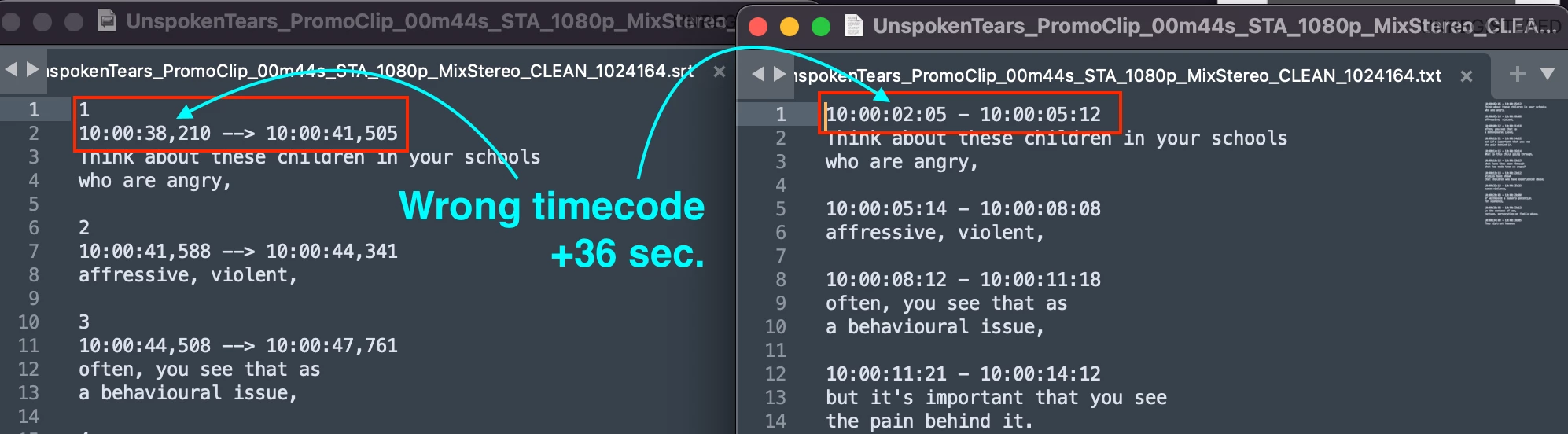
For example, on my timeline (starts at 10:00:00:00) the first caption arrives at 10:00:02:05 and when exporting this as an SRT file, the first caption arrives at 10:00:38,210 (PrPro added +36 sec to the timecodes). When I'm exporting the captions as a text file (.txt) I can see the right timecode. So, what's going on with the SRT output?


Here's a screenshot of the exported files (.srt vs .txt):
 

My version of Premiere Pro:

2.2.0 (Build 128)


My computer:

MacBook Pro (Apple M1 Max)

Memory 64 GB

macOS Monterey

version 12.1


Thank you in advance.

Best
Correct answer Stan Jones

Hello there,

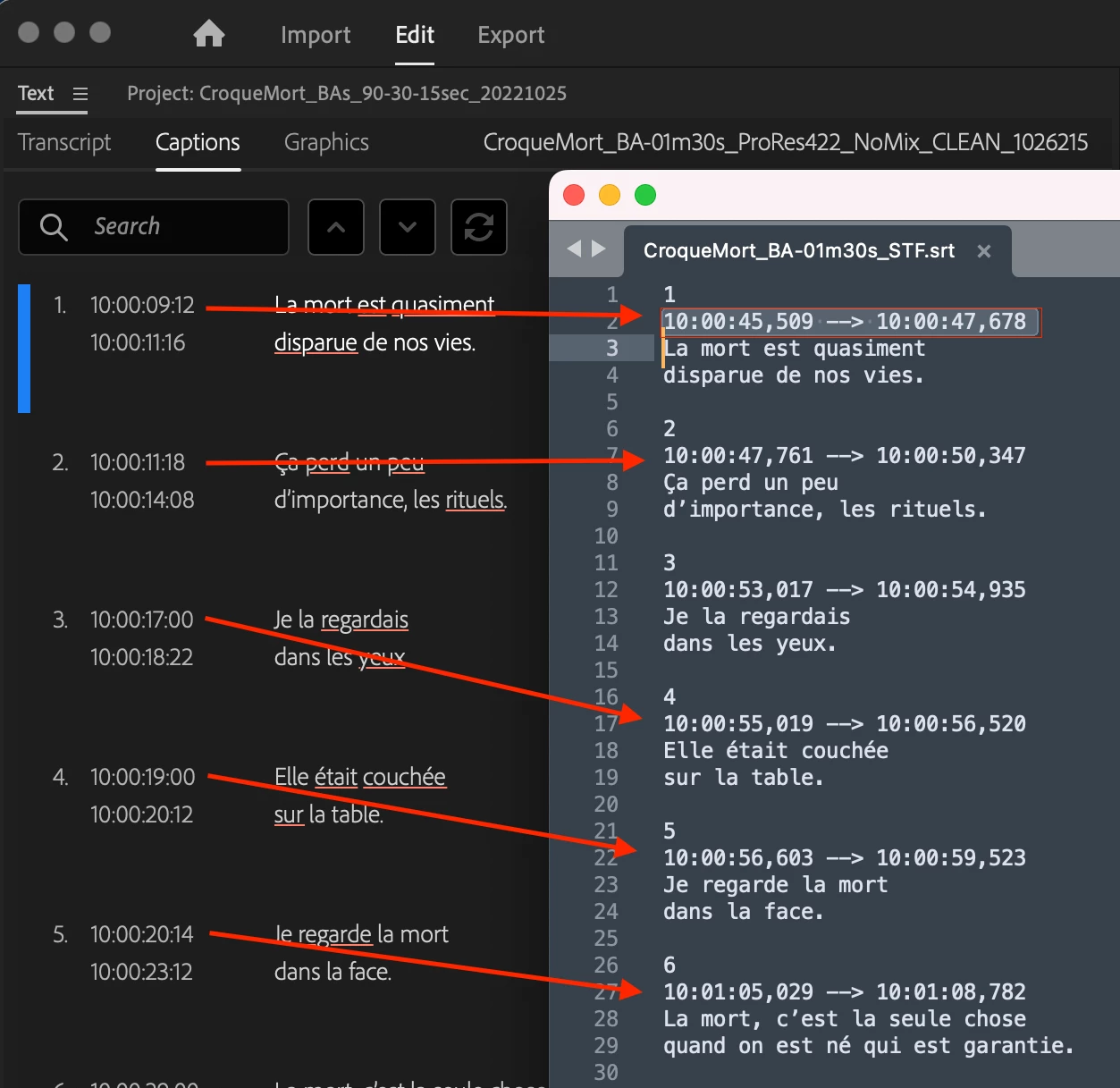
It's been awhile and after a couple of updated Premiere Pro versions, I still have the same bug. Every time I export an SRT file from my sequence there's a gap of +36 seconds in the timestams.


I've tried to import subtitles from an SRT file, create them myself and use the automatic transcription. No matter what, they still output with a wrong timecode.


Anyone else experiencing this?


Img. Left (Premiere Pro sequence). Right (exported SRT file)


Still very odd. I don't recall anyone else (still) reporting this particular issue.


I did not ask before (and it should not matter, but....), how do you get the 10 hour offset? Sequence -> Start time, or what?


Did you use the simple sequence test I described before? Have you tried this without the offset?


@Kartika Rawat @Trent Happel Any thoughts?


Stan


3 replies

Participant
March 6, 2024

I can confirm this issue with Premiere Pro 2022 on my box.

I did some math and it's mutiplying the correct numbers by 1001/1000 based on absolute frame number. That number might look familiat to video engineers.

I don't know if this is related to a setting somewhere, or why some people would have the problem and some wouldn't...

This is also happening with 2023 on my system.

Mac Pro Tower

3.2 GHz 16-Core Intel Xeon W

AMD Radeon PRO W6800X Duo 32 GB

192 GB 2933 MHz DDR4

OSX ver 13.3.1 (a) 

Mike Dziennik
Community Expert
Community Expert
February 15, 2022

Were the captions transcribed or created manually?

Is there only 1 subtitle track? 

zecarpio
zecarpioAuthor
Participating Frequently
February 15, 2022

Hi Mike,


They were created manually (from a .txt file that I've received with subtitles and timecodes).

There's only 1 subtitle track.


Thanks

Stan Jones
Community Expert
Community Expert
February 16, 2022

A screenshot of the text panel, timeline, and program monitor might help.


How are you getting a .txt file into PR? When I tested this, it showed .txt as an allowed filetype, but would not actually allow importing it.


Stan

Mike Dziennik
Community Expert
Community Expert
February 15, 2022

Can't replicate on my end.

What frame rate are you using? What happens if you select everything and copy/paste into a new sequence? Do they export with the offset?

zecarpio
zecarpioAuthor
Participating Frequently
February 15, 2022

Hi Mike,


The project is at 23,976 fps. And yes, I've tried to copy and paste into a new sequence but the problem is still there when exporting the SRT files. Though, the TXT files always seem to respect the timecodes from the sequences.


Thanks for your reply,

Best.