



全てのテキストの位置を一括で中央に揃えたい
縦型動画の字幕で中央に持っていきたいのですが、SRTで読み込んだキャプションをグラフィックにアップデートすると下の方にきます。その後整列の「水平方向に中央揃え」と「垂直方向に中央揃え」を押すと中央に来るのですが、その操作を全てのキャプションを一括で適応できなくて困っています。
最初の位置から単純に位置を丸ごと変えるべきなのでしょうか?それともそれ以前に何かいい方法があるのでしょうか?
わかる方、ご教示いただけたらと思います。
よろしくお願いします。
縦型動画の字幕で中央に持っていきたいのですが、SRTで読み込んだキャプションをグラフィックにアップデートすると下の方にきます。その後整列の「水平方向に中央揃え」と「垂直方向に中央揃え」を押すと中央に来るのですが、その操作を全てのキャプションを一括で適応できなくて困っています。
最初の位置から単純に位置を丸ごと変えるべきなのでしょうか?それともそれ以前に何かいい方法があるのでしょうか?
わかる方、ご教示いただけたらと思います。
よろしくお願いします。
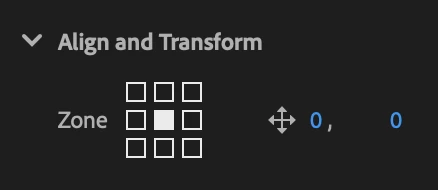
After importing the SRT, select all the captions in the Timeline panel. In the Properties panel, go to Align and Transform > Zone and click the center square to center them.

This option is only available while the captions remain captions, so apply it before converting them to graphics.
Already have an account? Login
No account yet? Create an account
Enter your E-mail address. We'll send you an e-mail with instructions to reset your password.