


Inspiring
August 28, 2026
Answered

同じクリップ内でテキストの行間だけを変えるには

  • August 28, 2026
  • 2 replies
  • 13 views

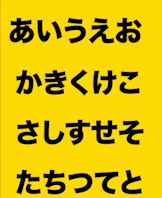
添付のように一つのテキストを改行した際に、「さしすせそ」と「たちつてと」の行間だけを狭めることはできるのでしょうか?

テキストサイズだと「たちつてと」だけを選択して小さくしたりはできるのですが、行間は「さしすせそ」と「たちつてと」を選択して行間の数値変えても、「あいうえお」の行間も一緒に変わってしまうため、教えていただきたいです。
分かりづらくてもうしわございませんが、よろしくお願いいたします。

osはmac tahoe26.2 premier26.0.1です
 

    Correct answer PaulMurphy

    Leading (line spacing) applies to all lines in a text layer, so you can't adjust the spacing for only part of the text while leaving the rest unchanged.

    To work around this, you have two options:

    • Use two separate text layers.
    • Press Return to add a new line, then adjust the font size of that line to control the spacing.

    2 replies

    PaulMurphyCommunity ExpertCorrect answer
    Community Expert
    August 29, 2026

    Leading (line spacing) applies to all lines in a text layer, so you can't adjust the spacing for only part of the text while leaving the rest unchanged.

    To work around this, you have two options:

    • Use two separate text layers.
    • Press Return to add a new line, then adjust the font size of that line to control the spacing.
    虎さんAuthor
    Inspiring
    August 29, 2026

    やはり難しいんですね。
    ありがとうございます。

    別の方法でやってみます!