


Answered
프리미어 실행할 때 시스템 호환성 보고서 오류가 자꾸 떠요
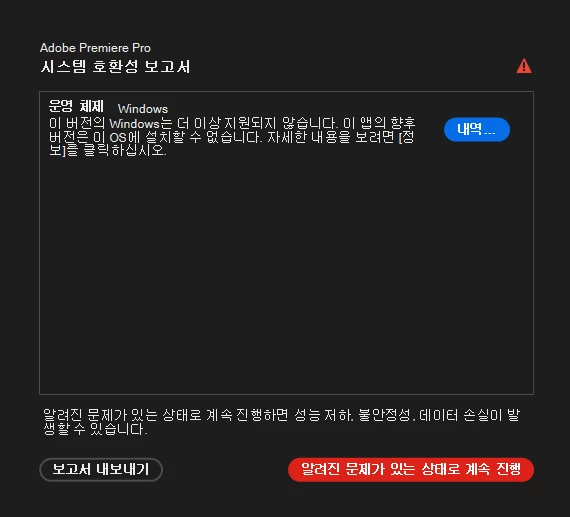
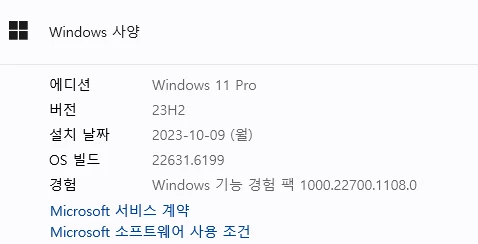
현재 윈도우 11 사용 중인데도 최신 버전 프리미어 실행 시 자꾸 위와 같은 안내창이 뜹니다
보고서 내보내기 후 확인하니 운영 체제가 윈도우 버전 10.0.22631.1이라고 뜬다는데 설정 들어가서 윈도우 사양 확인해 보면 분명 11Pro 버전이거든요… 해결 방법이 있을까요?
알려진 문제가 있는 상태로 진행을 누르면 일단 문제 없이 실행이 되긴 하지만 불편합니다 ㅜㅜ
아래는 보고서 내보내기 로그의 일부입니다.
시스템 구성 요소:
[운영 체제] Windows -
version : 10.0.22631.1
문제:
1. 이 버전의 Windows는 더 이상 지원되지 않습니다. 이 앱의 향후 버전은 이 OS에 설치할 수 없습니다. 자세한 내용을 보려면 [정보]를 클릭하십시오.
URL: https://helpx.adobe.com/kr/premiere/desktop/get-started/technical-requirements/adobe-premiere-pro-technical-requirements.html
ID: jira:DVAAP-3358
 AdChoices