

Participant
Jul 11, 2025 1:26 AM UTC
Question

프리미어 프로 마스크 오류

프리미어 프로에서 opacity 마스크를 사용하려고 누르면 이렇게 영상에 가로의 줄이 계속 나타납니다 이유 좀 알려주세요
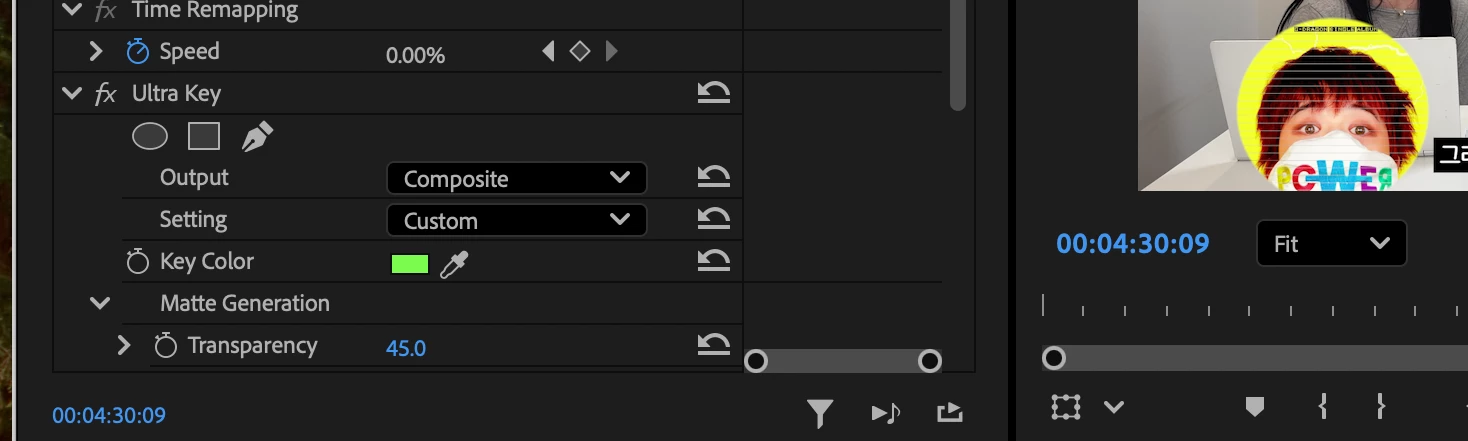

3 replies

Community Expert
Jul 11, 2025 1:48 AM UTC

Maybe try rendering the video by pressing enter. Do the lines appear if you disable Ultra Key? I'm wondering if may also be from the key.

Translate
Participant
Jul 11, 2025 5:31 AM UTC

i tried it by pressig enter , but it doesn’t work . When i try to use opacity - mask the horizontal lines keep viewing.


Translate
Ishan Y
Inspiring
Jul 11, 2025 9:37 AM UTC

Hi!

Sorry about the issue. Do you see the lines on video footage or still images (like PNG or JPEG files)? Please highlight the source file affected by this issue in the Project Panel > Right-click > Select Media File Properties, and share the details here. Please also share your current Premiere Pro version and OS details.


If you go to the Program monitor, click the wrench icon, select High Quality Playback, does that make the lines go away? Please let me know.


Thanks,

Ishan


Translate