



Florensics
Participant
July 21, 2021
Answered

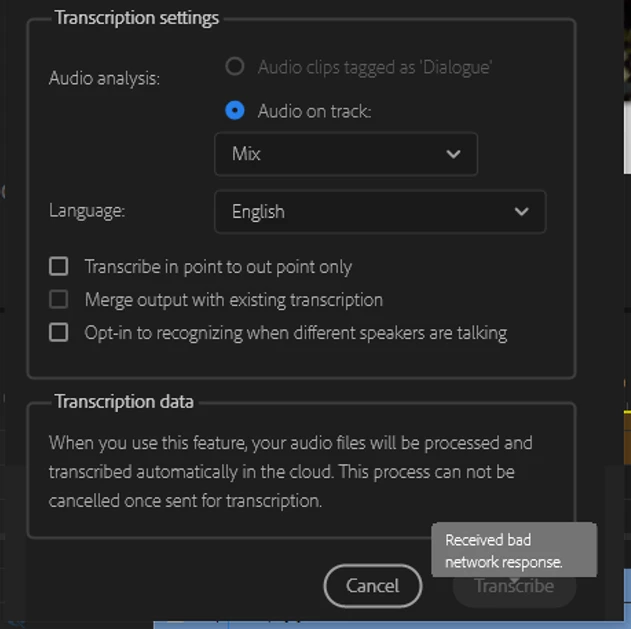
Bad network response from transcription

  • July 21, 2021
  • 3 replies
  • 27916 views

Hello,

Currently facing an issue where I am not able to transcribe sequences due to 'bad network response'. I have a perfectly normal internet connection to my PC and working on Adobe for Teams. This has only become an issue this morning, been working for the last few months fine. Any suggestions for a fix?


Thanks,
Flo


System info
    Application: Premiere Pro (Beta) v22.0.0.31
    OS: Windows v10.0.19043, RAM: 15.93 GB, CPUs (logical): 12

Correct answer Alexander_DVA

Thank you for your report.


You should have received a notification via the creative cloud desktop app within the last 6 months about the end of service date for the cloud based s2t service:


From the s2t help page (https://helpx.adobe.com/premiere-pro/using/speech-to-text.html)

For users running Premiere Pro 15.4, 22.0 or 22.1 

Effective February 7, 2023, Speech to Text is no longer supported on Premiere Pro 15.4, 22.0, and 22.1. Upgrade to the current version of Premiere Pro for full Speech to Text functionality. 


Best regards,

 Alexander

3 replies

Kevin-Monahan
Community Manager
Community Manager
August 4, 2023

Hi,

Thank you for your report.


You should have received a notification via the Creative Cloud desktop app about the end of service date for the cloud-based s2t service: From the s2t help page (https://helpx.adobe.com/premiere-pro/using/speech-to-text.html). We apologize if you did not receive the notification.


For users running Premiere Pro 15.4, 22.0 or 22.1 

Effective February 7, 2023, Speech to Text is no longer supported on Premiere Pro 15.4, 22.0, and 22.1. Upgrade to the current version of Premiere Pro for full Speech to Text functionality. 


Thanks,
Kevin

Kevin Monahan - Sr. Community & Engagement Strategist – Pro Video and Audio
Participant
May 2, 2023

I am trying to use the auto transcript which have been using for months but I now get the message: 

"Received Bad Network Response" 

Why am I experiencing this and how do I fix it? 


I've looked at previous threads on this from 2 years ago and THERE IS NO RESOLUTIONS! 


How do I contact support directly? Is there such a thing where you can contact support directly? 


Participating Frequently
May 2, 2023

Hey, Use Latest builds check if your facing the same issue or not? 

thanks,

Suraj.


Alexander Riss
Adobe Employee
Adobe Employee
July 21, 2021

Thank you for reporting this issue!


The first step to determine the root cause would be to open https://account.adobe.com/ to make sure all your licenses are showing up as expected and there are no warnings.


Next would be to log out and back in from the Creative Cloud Desktop App.


As a last step you can try to open https://adobe-voice.adobe.io/ in a browser - if this displays a warning like "Oauth token is not valid", it means that you can connect to the service itself. If you can not connect to this, you might need to update your firewall settings or follow up with your IT department to get this host onto the allow-list of the network.


Best regards,

 Alexander

Florensics
Participant
July 21, 2021

Hi Alexander,


Thank you for this and the prompt reply! I have checked my licenses at https://account.adobe.com/ and everything looks normal, no warnings; there is only a "Billing Issue" warning showing up from within Adobe apps when I start them up, but that is always there and there never actually is a billing issue when I check my account.

I've logged out and logged back in from the CC desktop app with no luck unfortunately.


Opening  https://adobe-voice.adobe.io/  shows:

Error code: 401013

Message: OAuth token is not valid

Regardless, I've added this host to the allow-list on the network and the problem still isn't resolved I'm afraid.


Thanks,

Flo

Alexander Riss
Adobe Employee
Adobe Employee
July 22, 2021

It sounds like there is an issue with your account information that might need manual clean up by support. 
Can you get in contact with support to inspect your account? If the desktop apps are seeing something that the account page does not see, it is quite likely that the cloud service is seeing the same issue and not letting it pass.


--

 Alexander