


MrSenpai
Inspiring
September 6, 2020
Question

Bug/Request: Render & Replace - ProRes Proxy

  • September 6, 2020
  • 2 replies
  • 289 views

There seems to be a missing preset in Render & Replace. Would love to see Adobe add "ProRes Proxy" preset to "Render & Replace" feature. 
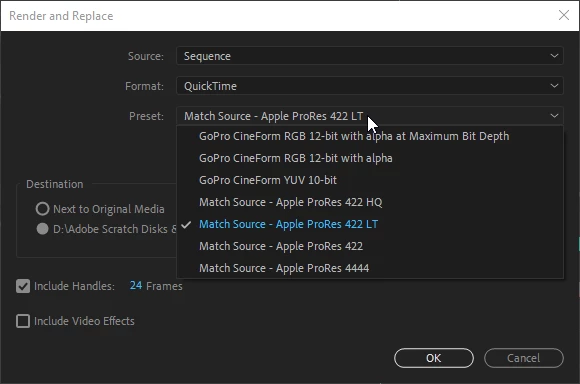
ProRes Proxy is what I use for my video previews in sequence settings, so it makes no sense that it's not available as an option in Render & Replace. It's a very easy preset for Adobe to add. This will be specially helpful for people who use Smart Rendering & use ProRes Proxy video previews

in sequence settings
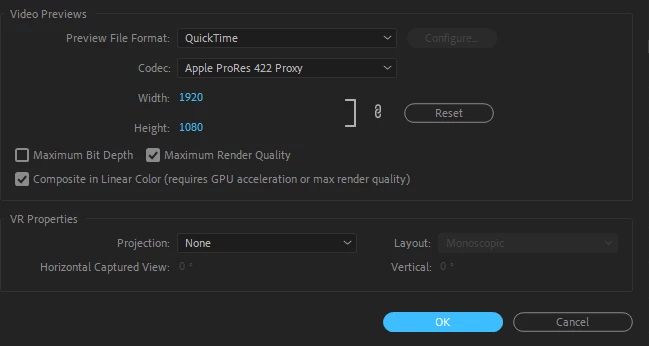
 

Why is this important? Because if my clip codec matches my video preview sequence settings, it completely removes any color bars from video and playback is perfectly smooth:

(look at clip on right compared to clip on left....clip on right doesn't even have any color on work bar because its codec matches my sequence video preview settings)
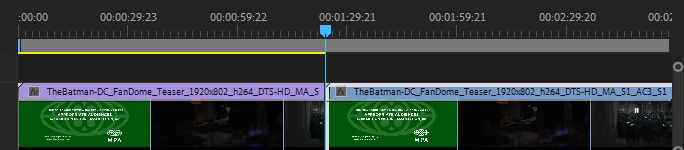
 

So yea, would be awesome if Premiere Pro added ProRes Proxy as a preset for "render and replace" since I use ProRes Proxy for my sequence video previews settings. 

This topic has been closed for replies.

2 replies

R Neil Haugen
Legend
September 7, 2020

Actually, it is there on mine ... even when I show the R&R screen.


Because I'd used the Import Preset option, after making a ProRes Proxy .epr export encoding preset in media encoder long time ago.


Which I'd forgotten I'd done, actually. It's a handy R&R for low-size, quick-playback work. Sorry for not including the full details.


Neil


Everyone's mileage always varies ...
R Neil Haugen
Legend
September 6, 2020

On my Win10 laptop, these are the options in the Pr public beta  QuickTime sequence Render & Replace options ... so I wonder why it isn't there on yours? It is on mine.


Neil


Everyone's mileage always varies ...
MrSenpai
MrSenpaiAuthor
Inspiring
September 7, 2020

Because your looking at video preview sequence settings, which has the ProRes Proxy preset. 

In the post, I was referring to "render and replace". Right click on a clip on your timeline, click on "render and replace" and you'll see that ProRes Proxy preset is missing in both Pr and Pr Beta