


Participating Frequently
October 1, 2024
Question

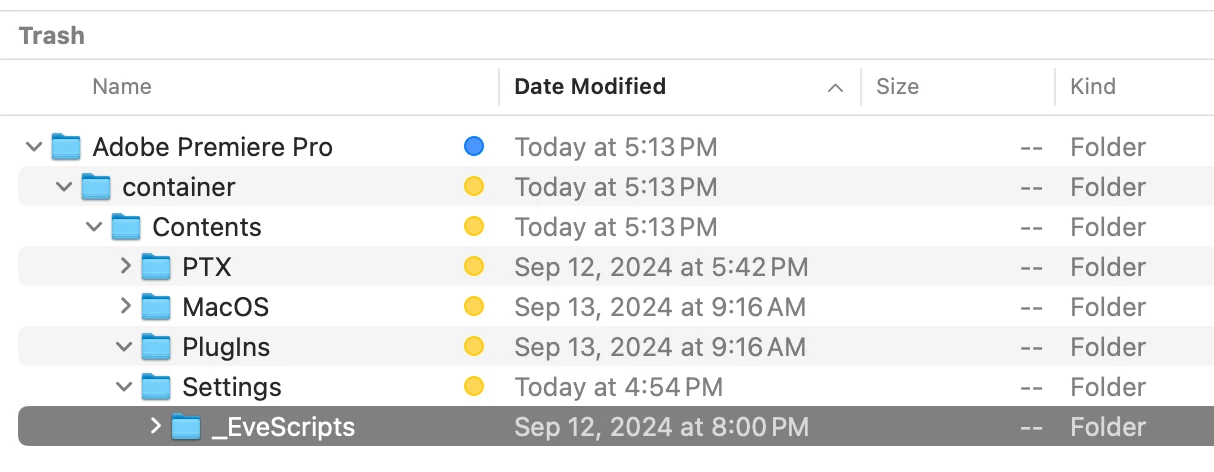
Can't empty Mac trash - Beta uninstall files - "_EveScripts" in use

  • October 1, 2024
  • 2 replies
  • 663 views

I uninstalled Premiere Pro Beta, but I can't complete empty trash on Mac Studio running Sonoma. I have checked permissions. Tried delete immediately, started in recovery mode to turn off SIP. It won't delete.
 

This topic has been closed for replies.

2 replies

Rag and Bone
Community Expert
Community Expert
October 10, 2024

Have you checked permisions on the file?  Have you made sure it's not locked? Have you tried using terminal?

That's all I've got 🙂


Michael7GAuthor
Participating Frequently
October 11, 2024

yes, yes, yes

terminal to delete, change ownership etc

Rag and Bone
Community Expert
Community Expert
October 4, 2024

Restart and try agian?

Michael7GAuthor
Participating Frequently
October 5, 2024

Have certainly done that. Shutdown every day. Started in recovery mode to disable SIP (recommended by others) and still there. Guess I will wait until projects slow down and install next OS and see if that works.

EuanWilliamson
Community Expert
Community Expert
October 5, 2024

Hi Michael,

I'm a Mac user and I'm sure in times past I've used a force empty trash option. 
I don't remember it exactly but a quick google should find it. 

Best regards, Euan.