



hellopaul4
Inspiring
May 21, 2021
Answered

Caption/subtitle test vanishes when edited in 15.4.0 build 3

  • May 21, 2021
  • 6 replies
  • 1149 views

Today I updated PPro to 15.4.0x3, and now when I click on a Caption (subtitle) to edit it, it turns black. I can still edit the text - by memory and guesswork.


Caption panel, not selected:
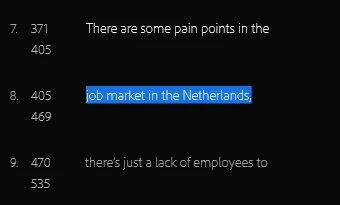
That same caption selected for editing:
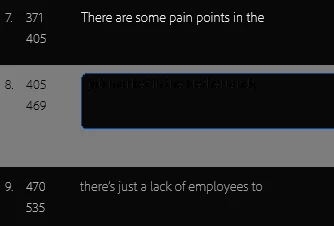
The caption text is still there - I can move the cursor around (the cursor is visible in real life, just not on the screenshot) and type stuff, but it's all just black on black. When I press Enter, it all reappears.


I've been working on this same project for a few days (in previous versions of PPro Beta) with no issues. I just updated my Nvidia drivers to see if that helped, but it made no difference.


Very annoying!


This topic has been closed for replies.
Correct answer Trent Happel

A fix just got checked in and should show up in the beta build in the next day or two.

6 replies

Community Manager
May 27, 2021

Thank you everyone for the quick verifications! You beat me to it. The text fix was added in 15.4 Beta build 008.

Participant
May 26, 2021
Thank you!

Pierre
------------------------------
Pierre Sauvage (sauvage@chambon.org)
*Weapons of the Spirit* and other documentaries

Chambon Foundationand Varian Fry Institute
8033 Sunset Boulevard
Los Angeles, CA 90046-2471
Tel: (323) 650-8986
------------------------------
Participating Frequently
May 27, 2021

In build 7, it's still black on black.
Also, when I type in Hebrew, the order of the charachters gets reversed in the program monitor. 

Stan Jones
Community Expert
Community Expert
May 27, 2021

LeTron, thanks for reporting on Build 7.


Regarding Hebrew, see Mike Berry's post:

https://community.adobe.com/t5/premiere-pro-beta/a-bug-in-importing-hebrew-srt-to-caption/m-p/11898718#M2696


Stan


Trent HappelCommunity ManagerCorrect answer
Community Manager
May 26, 2021

A fix just got checked in and should show up in the beta build in the next day or two.

hellopaul4
Inspiring
May 27, 2021

Yay! Fixed in Build 8! 😆
(...haven't checked any languages other than English though).

Community Manager
May 24, 2021

Thanks for the report. Sorry about that, our developers are investigating this issue.

hellopaul4
Inspiring
May 24, 2021

I can confirm the problem is still there on Build 6 (I'm sure you knew that already - but thought it might be helpful to confirm! 👍).

Stan Jones
Community Expert
Community Expert
May 22, 2021

Updated to beta PR 15.4.0 Build 4.


I confirm the bug you reported. I can double click a caption in the Text Panel, and it goes into edit mode. But as soon as I click to type, the text disappears, but the cursor shows the characters are still there. Is the font black instead of white?


Stan

Stan Jones
Community Expert
Community Expert
May 23, 2021

Just installed build 5. Same problem.


Stan

Stan Jones
Community Expert
Community Expert
May 21, 2021

It will be a bit before I can update to test. What happens when you edit the same text in the Program Monitor? I would expect it to work, and to make no difference on what you are seeing in the Text Panel.


Stan

hellopaul4
Inspiring
May 21, 2021

I can edit the text perfectly in the program monitor.
One thing I've noticed when editing text in the program monitor - pressing Enter behaves like pressing Return (i.e. it inserts a carriage return) but logically it should behave like elsewhere in Premiere - confirming the edits and exiting the text editing mode.

Stan Jones
Community Expert
Community Expert
May 21, 2021

I'll test this when I update to beta 15.4.


The Enter behavior is the same for 2021 captions in the Text Panel and the Program Monitor.


This is also the same behavior as in the Captions Panel in PR 2020 and before.


Stan